
Wallet Transaction Search
Search wallet transactions across a tenant without knowing the wallet, then analyse or reverse a transaction session
A wallet's Transaction History tab only helps once you already know which wallet to look at. Wallet Transaction Search removes that requirement — search by session id, card id, external id, or a date range, across every wallet in the tenant. This is the fastest way to understand a complex transfer or fund flow, for example a card payment that wrote a fee on a separate wallet, or a reversal that only partially completed.
Searching Wallet Transactions
Navigate to Search Item in the left-hand menu, then choose Wallet Transactions from the Search dropdown.
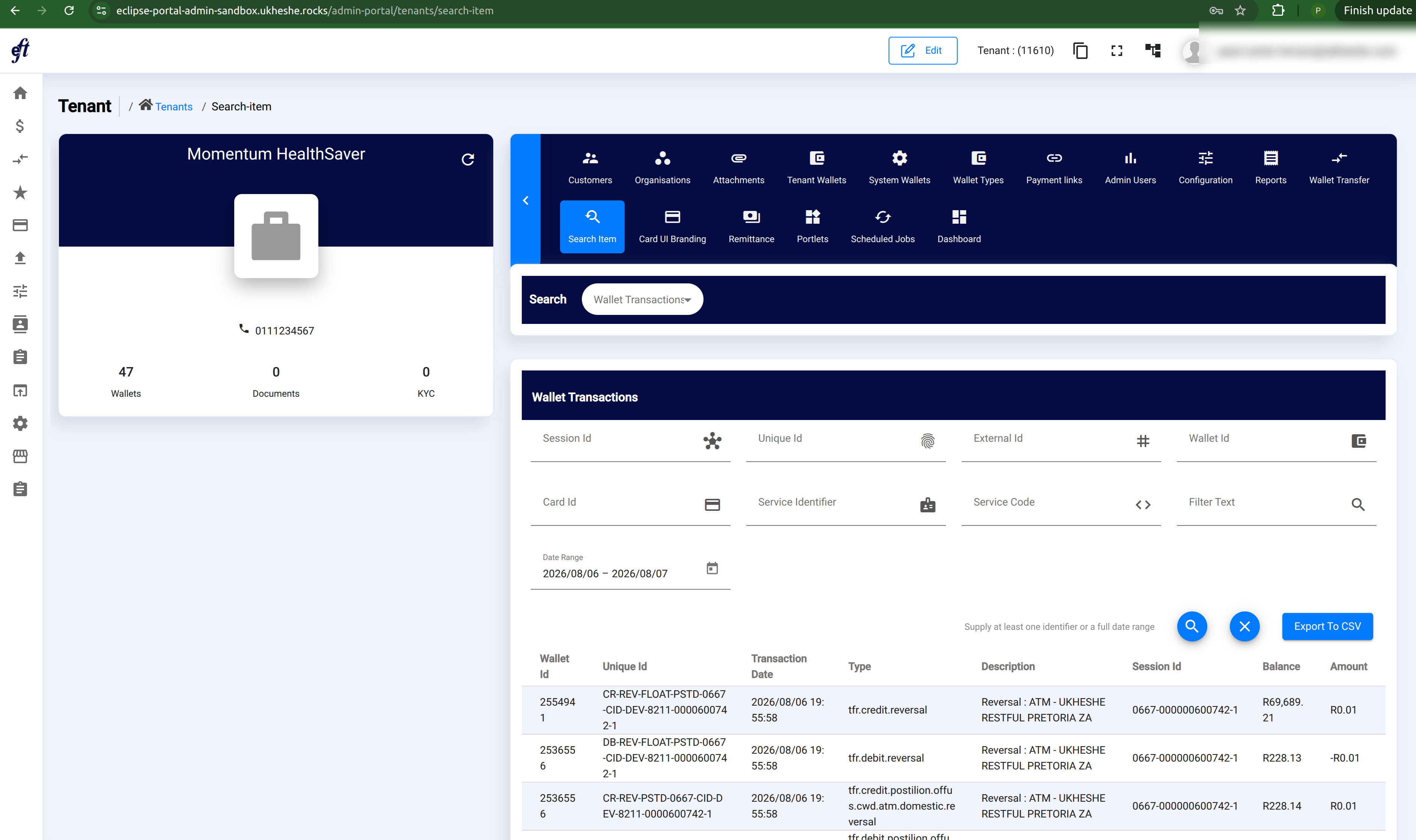
| Field | Description |
|---|---|
| Session Id | Every leg written by one transaction shares one session id. The fastest way to pull an entire transfer together. |
| Unique Id | The wallet history unique id, e.g. DB-PSTD-0667-CID-DEV-8211-0000600742-1. |
| External Id | The external id used when the transaction was initiated. |
| Wallet Id | Restrict the search to one wallet. Leave blank to search every wallet in the tenant. |
| Card Id | Filter to transactions on one card. |
| Service Identifier | Filter by service identifier. |
| Service Code | Filter by service code. |
| Filter Text | Free-text search across the transaction's description and other fields. Not case sensitive. |
| Date Range | Restrict to a date window. |
NoteYou must supply at least one of Session Id, Unique Id, External Id, Wallet Id, Card Id or Service Identifier, or a full Date Range. Without one of these, the search has no way to bound itself across every wallet in the tenant.
Results show the wallet, unique id, transaction date, type, description, session id, balance, and amount for every matching row. Use Export To CSV to download the current result set.
Viewing Transaction Details
Click any row to open its Transaction History.
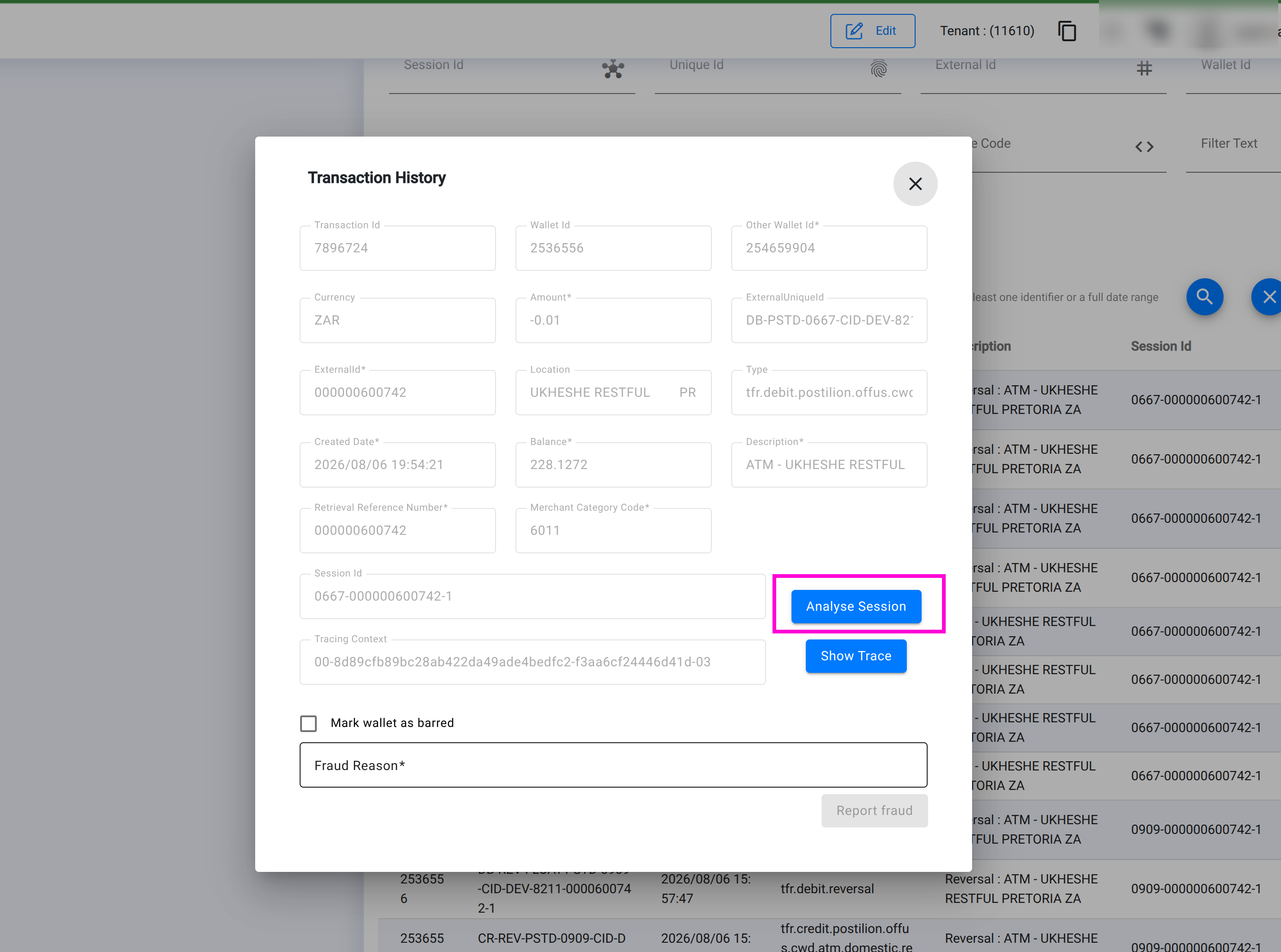
This shows the full detail of the selected leg — amount, currency, balance, location, retrieval reference number, merchant category code, and its Tracing Context, which identifies the distributed trace for the request that wrote this leg. See Distributed Tracing (Jaeger) in the Operator Guide.
NoteReallocation is not available from this screen, because a search across the whole tenant has no single wallet context to reallocate within. To reallocate a transaction, open it from the owning wallet's own Transaction History tab instead.
Analysing a Session
Every transaction detail view with a session id shows an Analyse Session button. Use it when one leg isn't the full picture — a card transaction, for example, typically writes a debit on the cardholder's wallet and a matching credit on a pool or settlement wallet under the same session id.
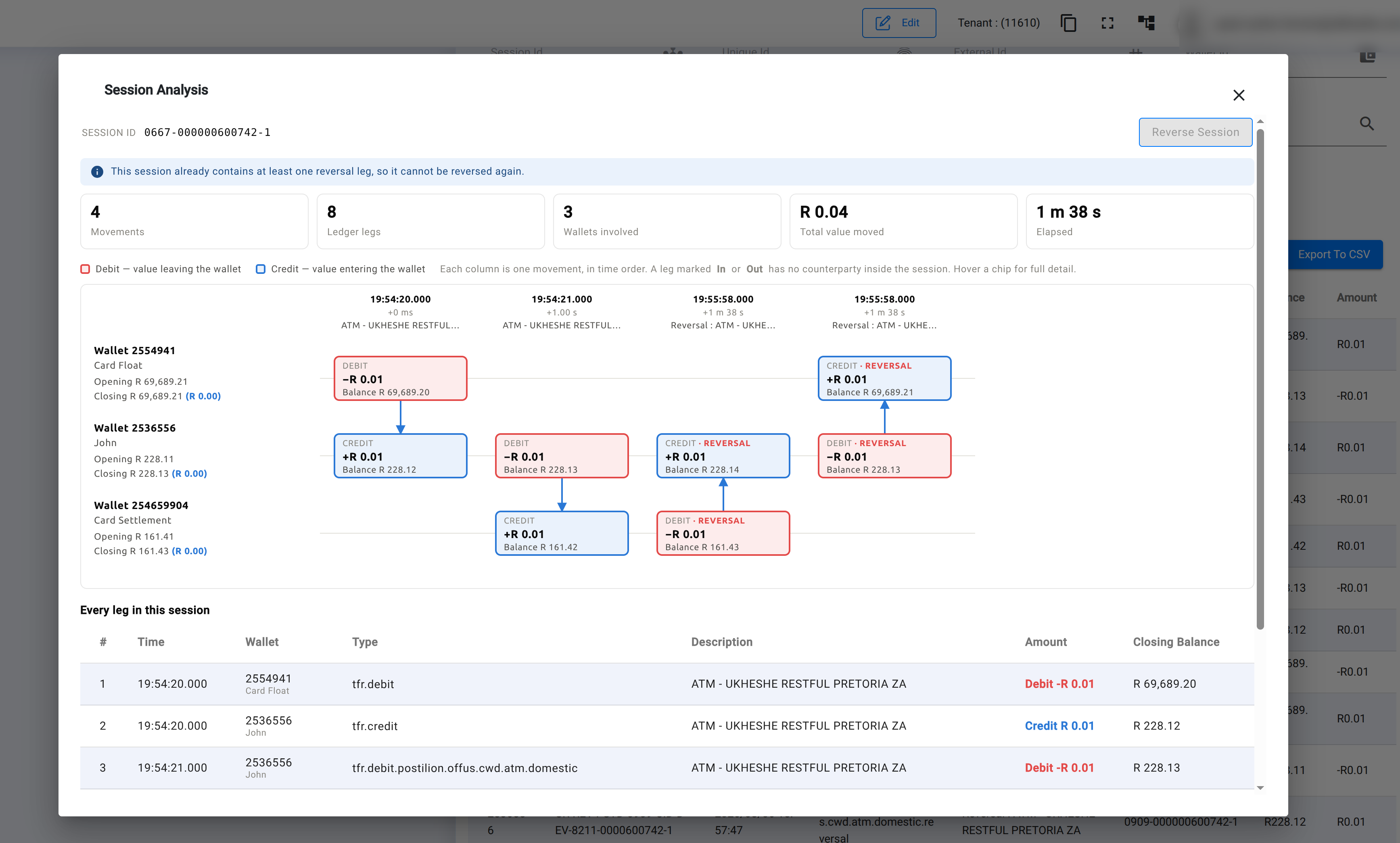
Session Analysis re-fetches every leg sharing that session id and lays them out as a diagram, in time order, with one lane per wallet touched by the session. Debits and credits that fund each other are paired and connected with an arrow; a leg with no counterparty inside the session — a card settlement, fee, or external top-up — is marked In or Out.
Above the diagram, a summary shows:
| Stat | Description |
|---|---|
| Movements | The number of paired or standalone value movements in the session. |
| Ledger legs | The total number of individual debit/credit rows. |
| Wallets involved | How many distinct wallets the session touched. |
| Total value moved | The sum of the session's credit legs. |
| Elapsed | Time between the session's first and last leg. |
Below the diagram, Every leg in this session lists each row with its time, wallet, type, description, amount, and closing balance — the same detail as the diagram, in table form for easy scanning or copying.
Reversing a Session
Use Reverse Session to reverse every transaction written under a session id in one action. This is intended for undoing a session that went wrong end-to-end, rather than reversing a single leg in isolation.
Before submitting, you're asked to confirm the total amount and the wallets affected — reversal cannot be undone.
Note
- A session that already contains a reversal leg cannot be reversed again — the banner above the diagram shows this and disables the button.
- The reversal API only accepts a session within 60 seconds of its first leg. Attempting to reverse an older session will most likely be rejected by the server, even though the button remains available.
Permissions Required
| Permission | Description |
|---|---|
| Standard tenant access | Required to search and view wallet transactions for a tenant. |
| Wallet reversal permission | Required to use Reverse Session. |
NoteA global equivalent of this search exists at the API level, for tracing a transaction whose legs may span more than one tenant. It's not yet exposed in the Admin Portal, and is restricted to global and institution-level roles. See Search Wallet Transactions Across a Tenant in the Integration Guide.
Updated about 2 months ago