
High Level Entities in Eclipse
High Level Entities in Eclipse
High-level Entity Description
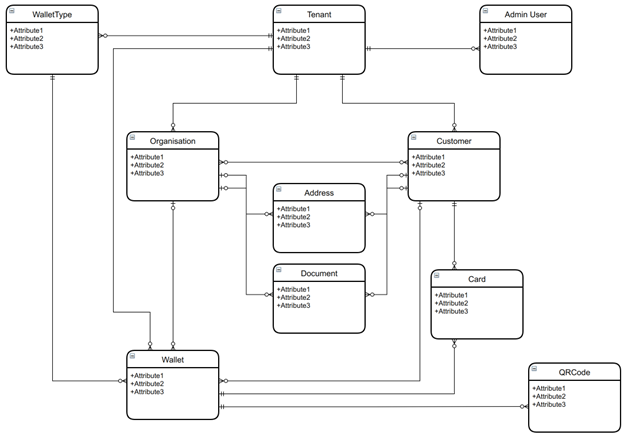
A Tenant is the contracting partner with EFT Corporation and is responsible for the management of their wallet programs and taking a fintech proposition to market. Depending on the scenario, a company could set up multiple tenants on Eclipse if they have different propositions with different goals and target markets.
- A Tenant has to be created before any other entity can be created or edited. It is the cornerstone of data segregation. A tenant can only access things within the tenant. This is enforced at multiple layers by Eclipse.
- A Tenant can have multiple customers and organisations under itself.
- A tenant can have admin users who can manage/administer Eclipse for the tenant.
- Customers and Organisations have addresses and documentation attributes to be used for KYC and reporting purposes.
- Tenants, Customers and Organisations can have wallets. Depending on the Wallet Type, a wallet can have an associated card (Physical and/or Virtual) and/or QR Code.
Data Segregation
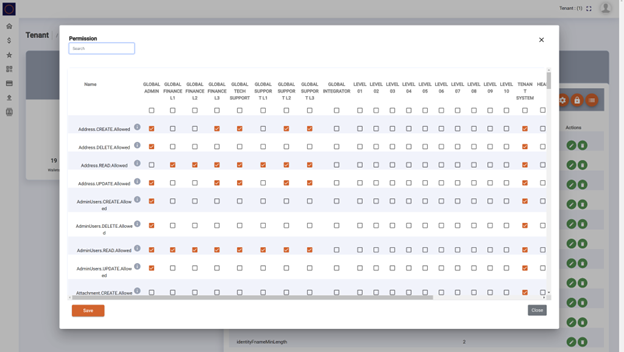
The data in Eclipse is stored in a geographically redundant distributed database where granular authorisation rules ensure that the API caller can only CREATE/READ/UPDATE/DELETE data accessible to the caller. A fundamental rule that is checked at multiple layers ensures that a tenant's data is only visible to that tenant and/or global users such as EFT Corporation administrators and support staff. This is all controlled via the granular access permissions configuration set up per tenant.
Here is an example of a part of the permissions configuration:
Data Segregation
This data segregation allows not only for a tenant to ensure that their data is theirs, but also that within the tenant, they can control who can see/do what. This helps ensure that for example customer A on tenant 10 cannot see customer B’s data even if they are also on tenant 10.
If a tenant wishes, the permissions can be set so that not even EFT Corporation staff can see their data (other than GLOBAL_ADMIN which is required for some severe operations tasks). This would however mean that EFT Corporation cannot support the tenant with queries via the admin portal as they would not have access.
EFT Corporation considers a tenant's data to belong to the tenant and does not distribute, share, extract or otherwise utilise the data for any other purpose other than to support the tenant in their business operations and billing the tenant for Eclipse usage.
Customer Data Protection
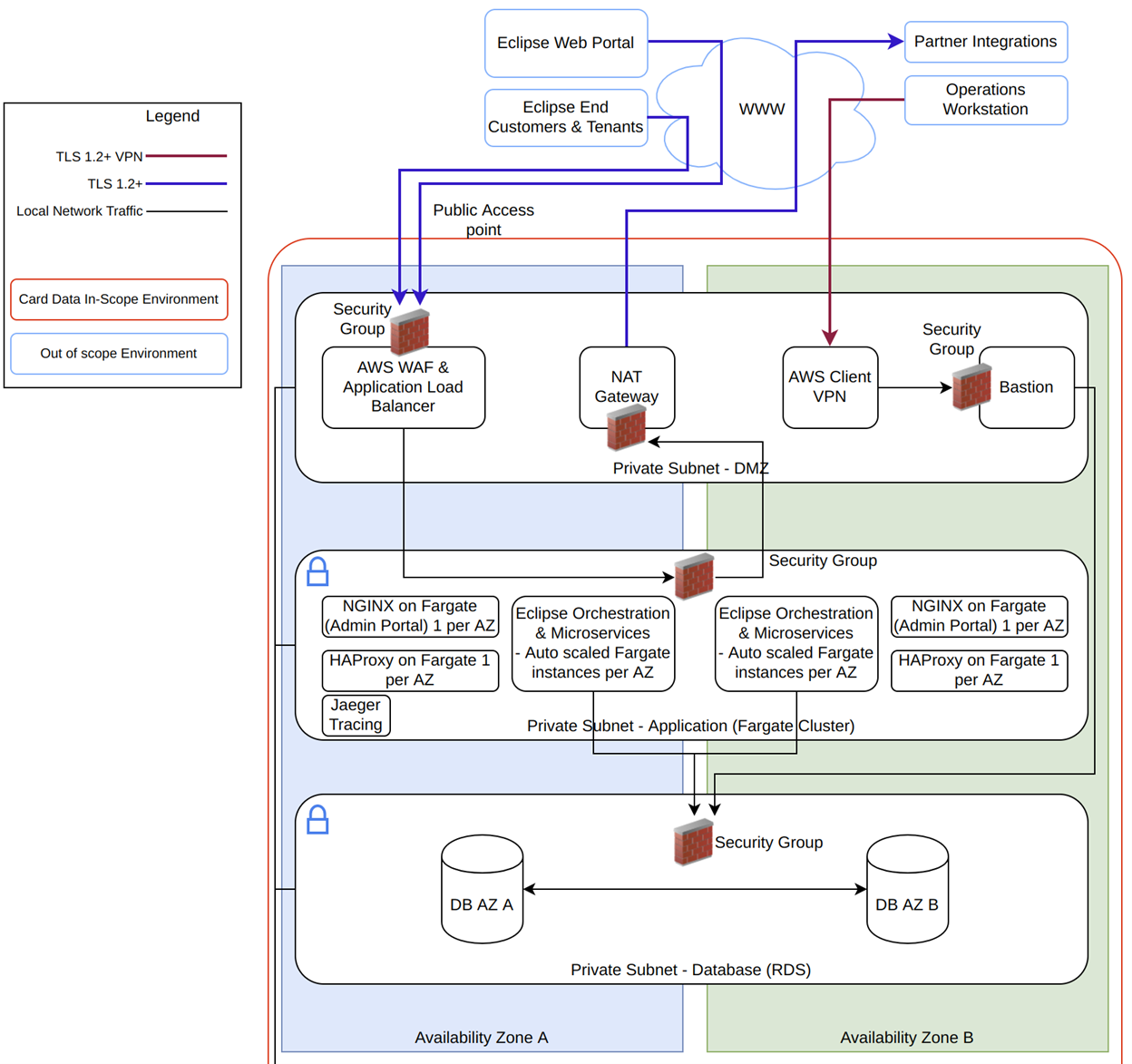
All data transferred between tenants and Eclipse APIs are encapsulated in a TLS1.2+ encrypted tunnel. This encryption terminates on an AWS load balancer that then re-encrypts it and passes it to private subnets for processing within EFT Corporation applications. When data is stored, it is AES 256 bit encrypted at rest with keys only available to EFT Corporation. This encryption-in-transit and encryption-at-rest apply to all customer personal data, documents and transactions. Very similar technology used for PCI/DSS compliance in card data security is mirrored in the security of customer data.
Customer Data Protection
Global Admin Users, Institution Admin Users, Tenant Admin Users & Customers
There are several different types of Users in Eclipse and ways in which they are modelled in the data structure:
Global users: These users have a role (user_role table) which starts with GLOBAL_. The role is global and hence applies across all tenants. For example if a GLOBAL role lists tenants they would see all tenants. Their permissions are still defined at tenant level but global users are as they are termed - global
Institution users: These users have a role (user_role table) that starts with INSTITUTION and ends with a 3 character institution Id. These users can see all tenants assigned to their institution id. Example INSTITUTIONADMIN_ABC would be for institution ABC. A tenant is assigned to an institution via an AVP under its preferences e.g.
{"att":"institution","val":"ABC"}Tenant Admins: These are users with a position (user_position) in an organisation id that is a tenant (organisation type=tenant). Example positions TENANT_SYSTEM, LEVEL_01 etc
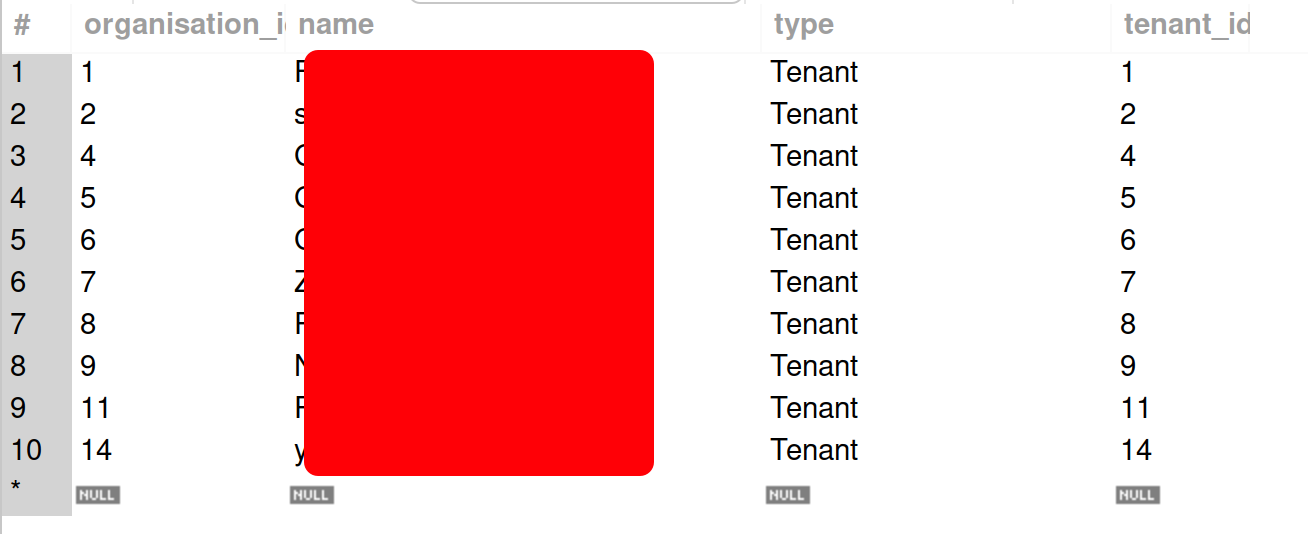
Customers: Customers have no roles but can have positions in organisations that are not of type=tenant. E.g. a customer could be a MANAGER of an organisation under a tenant. It's important to note that a tenant is just a special organisation (is a row in organisation table) but the type (column in organisation table) = tenant.
Customers and Organisations are aligned to a tenant via the "tenant_id" column on the user and organisation table. a tenant has tenant_id equal to their organisation id:
Updated 5 months ago