
Wallet Hierarchy & Fund Flows
Wallet Hierarchy
Eclipse has a concept of wallet types, which can be set up under a tenant. One specific wallet type is a SYSTEM wallet which has rules that it can only be debited by the system itself. These wallets are used as the source for incoming funds and the destination for outgoing funds.
Non-system wallets such as digital wallets and card wallets hold funds which are effectively backed by real money in a suspense account at a bank. The sum total of money in these wallets (the purple area below) would equal that in the tenant's suspense account (other than slight timing differences). Funds flowing into the suspense account via top-up mechanisms result in a debit of an incoming payment wallet (blue wallets) and a credit of a purple wallet.
Withdrawals from purple wallets result in a debit of the wallet and a credit of a withdrawal destination (green wallet) and possibly of a fees wallet.
Card spend in purple wallets results in debits off a card settlement suspense account which is in turn kept at a float by debiting the suspense account.
The source and withdrawal SYSTEM wallets are configurable and can be the same or different for each top-up/withdrawal type. The ledger of these wallets is available to the tenant for reconciliation purposes but tenants cannot debit from them. The balance in these wallets does not represent real money, and — like the Tenant Pool Account wallet — they are permitted to carry a negative balance. The safety net here is not a zero floor but a configurable minimum balance (credit limit) per wallet type: this can be constrained to cap how negative a wallet is allowed to go, limiting the platform's exposure if an external system error causes an unexpected surge of incoming funds.
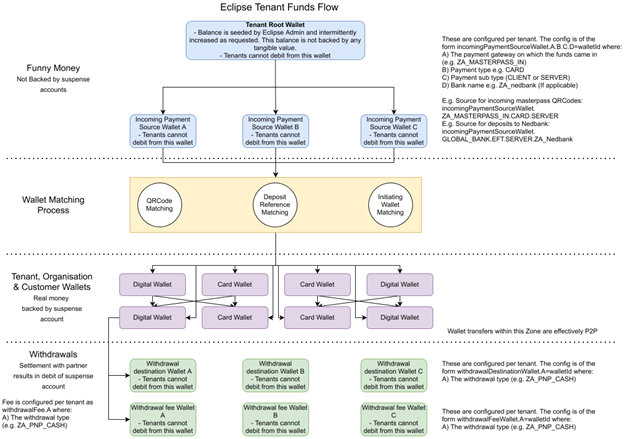
Flow of Funds
1. Tenant Pool Account
All balances in any SOV (Digital Wallet or Card Wallet) are triggered by the deposit of actual cash into a Bank Account. For each Tenant, this Bank Account is the Tenant Pool Account. Each Tenant must have a Pool Account allocated to start funding any SOV.
The Tenant Pool Account is represented internally by a Pool Account SYSTEM wallet. Unlike other SYSTEM wallets, the Pool Account wallet is permitted to carry a negative balance. The actual bank account behind the Tenant Pool Account is credited when money comes in and debited when money leaves; the Pool Account wallet mirrors this balance in reverse — it is debited for inflows and credited for outflows, so at any point in time its balance is the negative reflection of the actual balance held at the bank.
The following rules govern how funds move relative to the Pool Account wallet:
- Inflows (e.g. top-ups via EFT_IN, Retail Deposit, or card funding) – Money is deposited into the Tenant Pool Account at the bank. The Pool Account wallet is debited and the wallet being funded (e.g. a Digital Wallet) is credited.
- Inter-platform transfers (e.g. spending from a Digital Wallet into a Card Wallet, a VAS or ATM purchase, or a Tenant Fee being charged) – Money moves between wallets within the platform; no money leaves the Tenant Pool Account at the bank. The source wallet is debited and the destination wallet is credited, and the Pool Account wallet is not affected.
- Outflows (e.g. EFT_OUT, ATM_OUT, or the settlement of Card, VAS, Retail, or Tenant Fee wallets) – Money leaves the Tenant Pool Account at the bank. The wallet holding the funds to be paid out is debited and the Pool Account wallet is credited, immediately ahead of the corresponding EFT_OUT that moves the money out of the bank account.
For example, a card purchase debits the customer's Digital Wallet and credits a Card Wallet — an inter-platform transfer that does not touch the Pool Account wallet. At the point of settlement, an EFT_OUT is performed from the Card Wallet: this debits the Card Wallet and credits the Pool Account wallet, ahead of the funds being paid out externally. VAS, ATM_OUT, Retail Withdrawal, and Tenant Fee settlements follow the same two-step pattern — see the Spending/Withdrawal Process below.
Disbursements work the same way. Funds are deposited into a prefunded Tenant wallet exactly as with any other top-up — the Pool Account wallet is debited and the Tenant wallet is credited. The subsequent bulk disbursement to individual customer wallets is a series of inter-platform transfers: the Tenant wallet is debited and each customer wallet is credited. The Pool Account wallet is not affected, since no money leaves the system.
2. Funding process
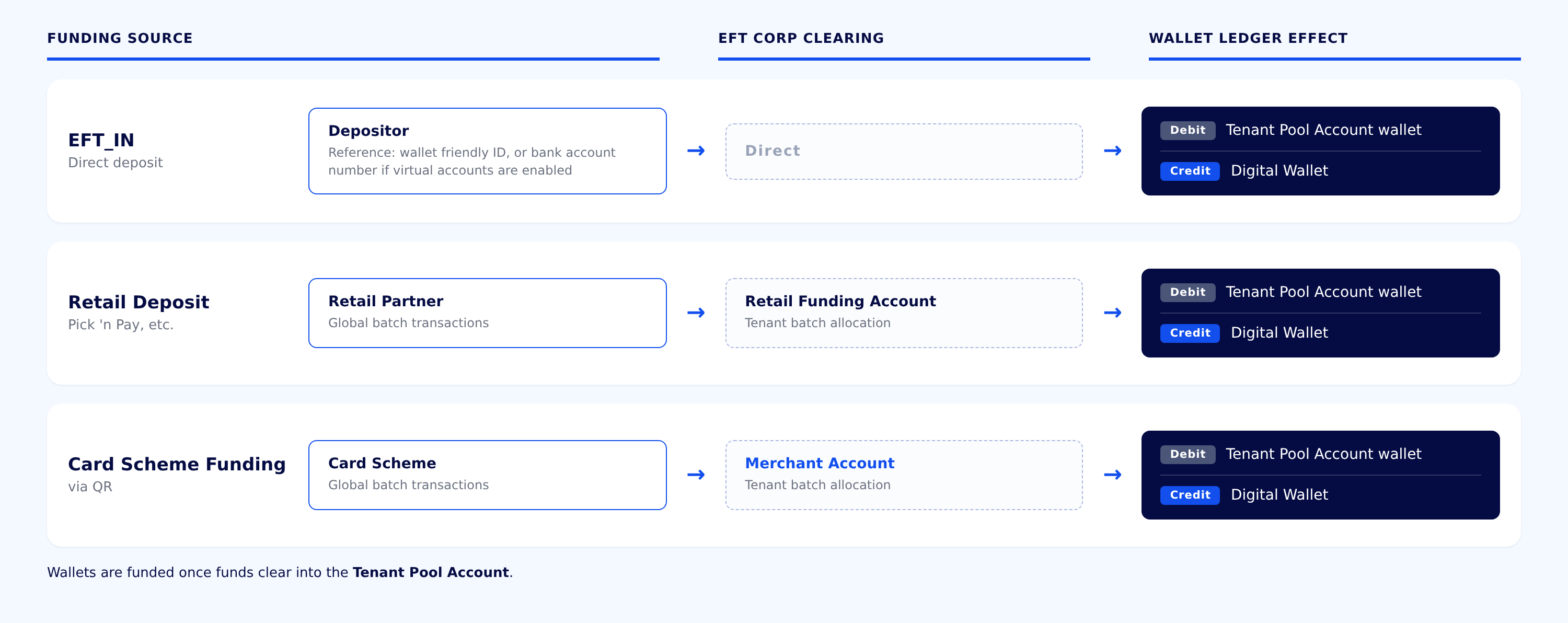
The funding of the Pool Account is linked to the SOV funding sources (e.g. EFT_IN, Retail (Pick ‘n Pay), card scheme funding (via QR), etc.). Each funding source must be enabled first before being used. The following are required:
- EFT_IN – Deposits can be made directly into the Tenant Pool Account using the wallet's friendly ID as the payment reference. Where virtual accounts are enabled, the wallet's primary bank account number can be used as the reference instead. Virtual accounts are enabled by the sponsor bank, which assigns a dedicated bank account number range to the platform; deposits made to an account number within that range are automatically allocated to the matching wallet. Wallets will be funded once funds clear into the Tenant Pool Account.
- Retail Deposit – This must be configured as per the Integration Guide. Funds deposited at retail partners are transferred to EFT Corporation in a batch and finance allocates them to the respective Tenant Pool Accounts. Wallets will be funded once funds clear into the Tenant Pool Account.
- Card Scheme Funding (via QR) – The Tenant will need a Merchant acquiring license to be able to acquire via card (i.e. fund the SOV through card). If the Tenant does not have a Merchant license, they can use EFT Corporation's license with the Merchant account opened in EFT Corporation's name and assigned to the Tenant. Wallets will be funded once funds clear into the Tenant Pool Account.
NoteWhether an incoming payment credits a wallet immediately or is held until funds have actually landed in the Tenant Pool Account is controlled by the
reserveIncomingPaymentstenant configuration (with per-gateway/payment-type overrides, e.g.reserveIncomingPayments.ZA_OZOW.EFT). When enabled, the payment is held as a reservation against the wallet — for a configurable duration or cron schedule — rather than being immediately available, until inter-bank settlement is confirmed.
3. Spending/ Withdrawal Process
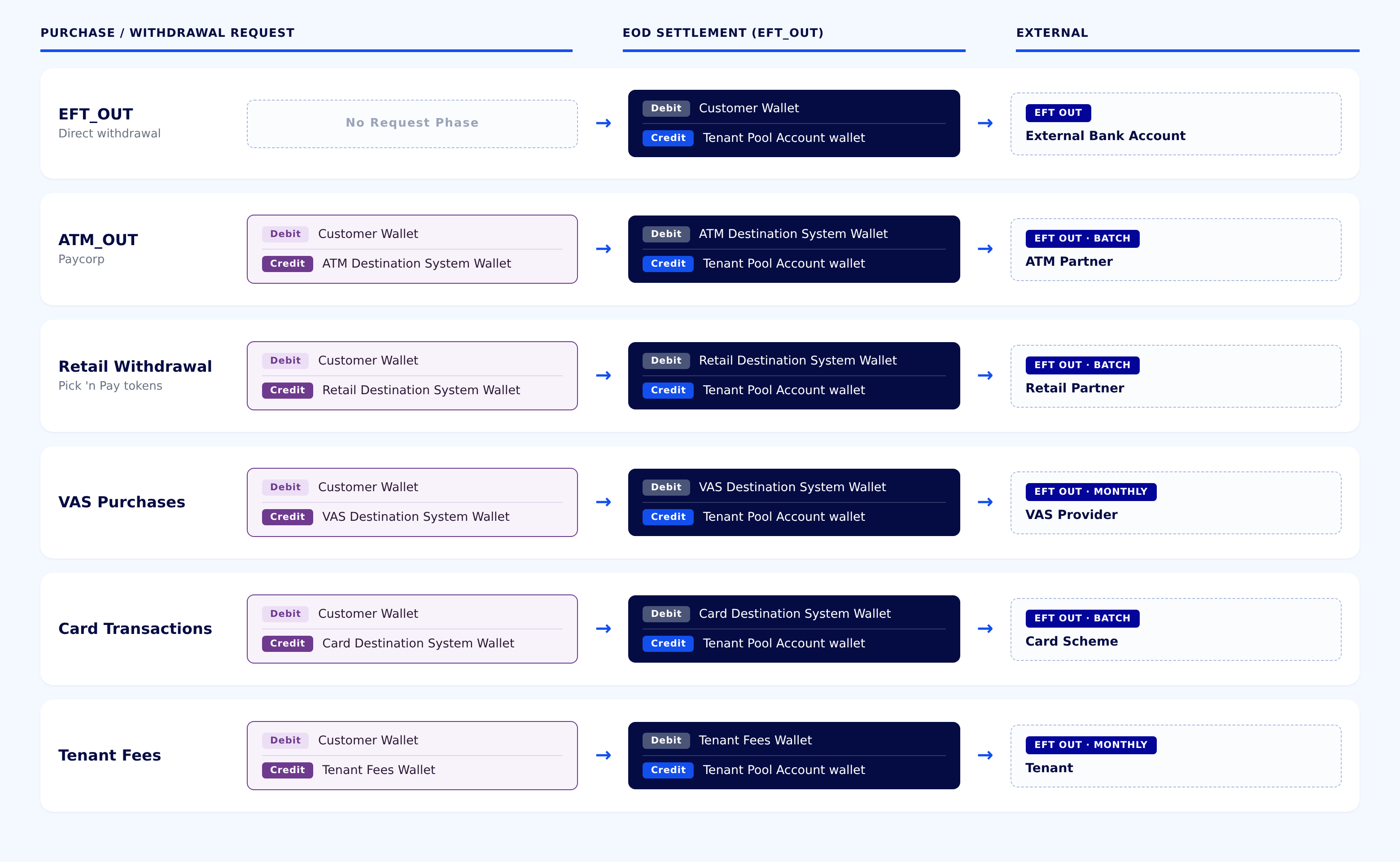
All spending or withdrawal actions by the Tenant/ Tenant’s customers will be settled out of the Tenant Pool Account. The spending/ withdrawal sources are linked to the spending/ withdrawal sources of the SOV (e.g. EFT_OUT, ATM_OUT (Paycorp), Retail withdrawals or tokens (Pick ‘n Pay), VAS Purchases, Spend/ Withdrawal from Card Wallets). Each withdrawal or spending source must be enabled first before being used.
The following are required
- EFT_OUT – Withdrawals are debited directly from the Tenant Pool Account.
- ATM_OUT - This must be configured as per the Integration Guide. Settlements are facilitated by EFT Corporation as per the settlement terms agreed with the ATM partner. A customer withdrawal debits the customer's Digital Wallet and credits the ATM Destination System Wallet; at settlement, an EFT_OUT debits the ATM Destination System Wallet and credits the Tenant Pool Account wallet, ahead of the batch payment to the ATM partner.
- Retail Withdrawals - This must be configured as per the Integration Guide. Settlements are facilitated by EFT Corporation as per the settlement terms agreed with the retail partner. A retail withdrawal debits the customer's Digital Wallet and credits the Retail Destination System Wallet; at settlement, an EFT_OUT debits the Retail Destination System Wallet and credits the Tenant Pool Account wallet, ahead of the batch payment to the retail partner.
- VAS Purchases - This must be configured as per the Integration Guide. A VAS purchase debits the customer's Digital Wallet and credits the VAS Destination System Wallet; at settlement, an EFT_OUT debits the VAS Destination System Wallet and credits the Tenant Pool Account wallet. Sale proceeds are settled to the Tenant from the Tenant Pool Account monthly.
- Card Transactions – A Card programme must be configured with the relevant card scheme to allow the Tenant to have a card programme and issue Card Wallets into which funds can be transferred from the Digital Wallets. Card purchases debit the customer's Digital Wallet and credit the Card Destination System Wallet; at settlement, an EFT_OUT is initiated to move money to the designated settlement account. This debits the Card Destination System Wallet and credits the Tenant Pool Account wallet, ahead of the card scheme's settlement process.
- Tenant Fees – Tenants can configure fees for any movement of a wallet (Digital or Card). A fee debits the customer's wallet and credits the Tenant Fees wallet; at settlement, an EFT_OUT debits the Tenant Fees wallet and credits the Tenant Pool Account wallet, ahead of the funds being settled to the Tenant monthly.
4. Card Reversals & Refunds
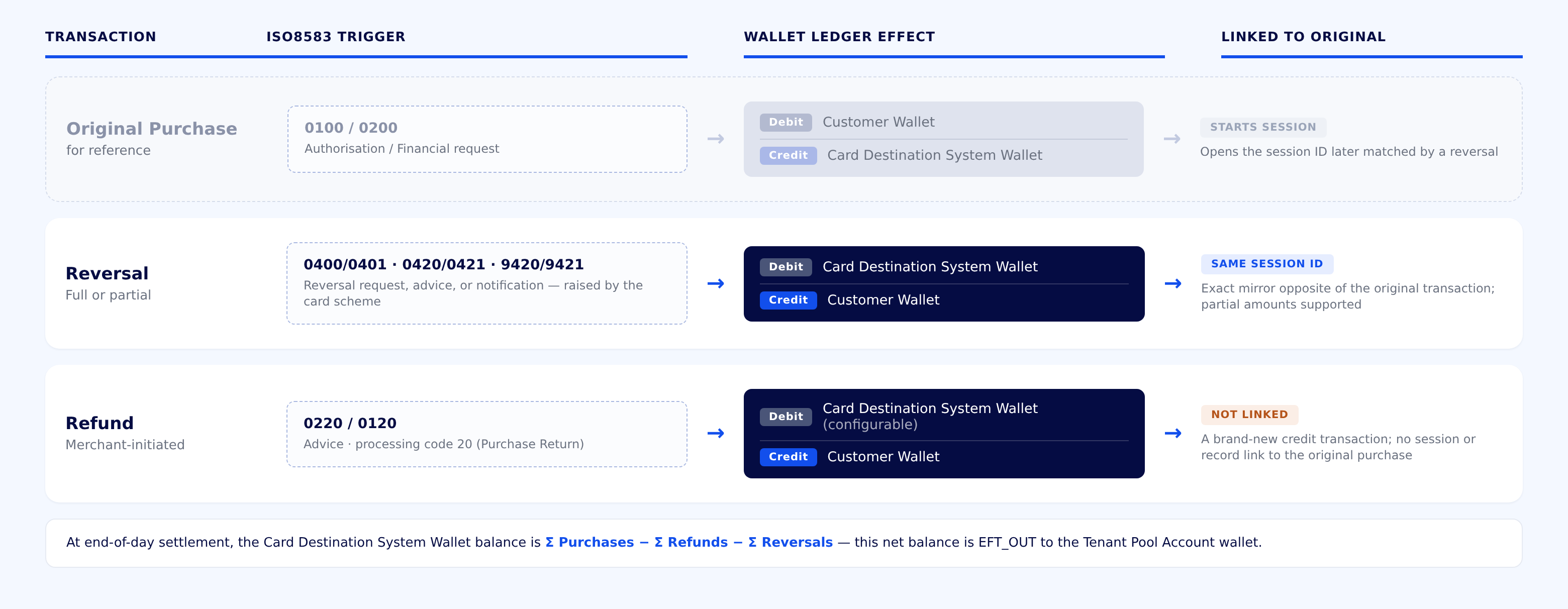
Card reversals and refunds arrive from the card scheme as ISO8583 messages, separate from the original purchase message, and are both applied against the same Card Destination System Wallet used for Card Transactions above.
- Reversal – Raised by the card scheme when a transaction times out, fails on a downstream leg, or is otherwise not completed as authorised (ISO8583 MTI 0400/0401 reversal request, 0420/0421 reversal advice, or 9420/9421 reversal notification). A reversal is the exact mirror opposite of the original transaction, matched by session ID: it debits the Card Destination System Wallet and credits the customer's Digital Wallet for the reversed amount. Partial reversals are supported, reversing only the outstanding portion of the original transaction.
- Refund – Raised by the merchant/acquirer as a Purchase Return (processing code 20, typically arriving as a 0220/0120 advice). A refund is a completely new credit transaction, unconnected to the original purchase, that follows the opposite flow to a purchase: the customer's Digital Wallet is credited and the Card Destination System Wallet is debited. The wallet funding the refund can be configured per tenant, but defaults to the same Card Destination System Wallet the original purchase settled to.
NoteThe Card Destination System Wallet's balance at end-of-day settlement is the net of all card activity for the period — the sum of all purchases (debits) less the sum of all refunds and reversals (credits). It is this net balance that is EFT_OUT to the Tenant Pool Account wallet, ahead of the card scheme's settlement process.
5. Manual Reconciliation (Limited Scenarios)
The scalable, correct way to keep the Tenant Pool Account aligned with the actual bank account is to implement deposit notifications and EFT reference matching, as described in Pool Account Integration.
For a limited use case — for example, a tenant with no individual customer top-ups, where Card Wallets are funded only by disbursement — it's possible to implement the same flow of funds manually instead. In this scenario, the Tenant Pool Account is implemented as a Tenant wallet rather than a SYSTEM wallet, since a SYSTEM wallet can only be credited or debited by the platform itself, whereas a manual process requires a person to perform the transfer.
- Manual EFT_IN – Money entering the system (typically into a disbursement wallet) is recorded by manually debiting the Tenant Pool Account (Tenant wallet) and crediting the disbursement wallet.
- Manual EFT_OUT – Money leaving the system is recorded by manually debiting the relevant destination wallet and crediting the Tenant Pool Account (Tenant wallet).
Updated about 2 months ago