
Asynchronous Report Delivery
How to generate large Eclipse reports in the background and receive the output automatically via email, HTTP callback, or Jira.
Synchronous report requests have a 15-second timeout. For reports that take longer — large date ranges, high-volume tenants, complex queries — Eclipse supports asynchronous delivery. You submit the request, Eclipse generates the report in the background, and notifies you when it is ready.
How It Works
- Submit a report request with
streamResult=trueand your chosen delivery mechanism. - Eclipse returns
HTTP 204 No Contentimmediately. There is no report data in this response. - Eclipse generates the report asynchronously, packages the output as a password-protected ZIP file, and uploads it to a secure, time-limited S3 URL.
- Eclipse notifies you via your chosen delivery channel (
email,http, orjira) that the report is ready. - Download the ZIP from the provided URL and unzip it using the supplied password.
Request Parameters
Add these parameters to any standard Reports API request to trigger async delivery:
| Parameter | Type | Description |
|---|---|---|
streamResult | Boolean | Set to true to enable async delivery |
deliveryMechanismType | String | How to notify you when the report is ready: email, http, or jira |
deliveryMechanismValue | String | The email address, callback URL, or Jira reference for the notification |
Example request:
GET /eclipse-conductor/rest/v1/tenants/{tenantId}/reports/Report_digital_wallet_transaction_detail?d1=2024-01-01T00:00:00.000&d2=2024-02-01T00:00:00.000&format=csv&streamResult=true&deliveryMechanismType=http&deliveryMechanismValue=https://myapp.example.com/webhooks/report-ready
Authorization: Bearer {jwt}
HTTP Callback Delivery
When deliveryMechanismType=http, Eclipse POSTs a JSON object to your callback URL when the report is ready:
{
  "reportId": "Report_digital_wallet_transaction_detail",
  "reportUrl": "https://<bucket>.s3-eu-west-1.amazonaws.com/<filename>.zip",
  "password": "Wyr79qYz5F",
  "linkExpiryDays": 1
}| Field | Description |
|---|---|
reportId | The report that was generated |
reportUrl | S3 URL to download the ZIP. Valid for linkExpiryDays days |
password | Password required to open the ZIP |
linkExpiryDays | Days until the download URL expires |
Download and unzip:
curl -o report.zip "https://<bucket>.s3-eu-west-1.amazonaws.com/<filename>.zip"
unzip -P "Wyr79qYz5F" report.zip
The S3 URL expiry period and bucket are configured by your Eclipse operator via the reportstreamer.s3bucket.name and reportstreamer.s3bucket.expiry.days platform properties.
Email Delivery
When deliveryMechanismType=email, set deliveryMechanismValue to the recipient email address. Eclipse sends an email containing the S3 download URL, the ZIP password, and the expiry period.
The email template is configured by your Eclipse operator via the mustache.email.s3bucket.details platform property.
Jira Delivery
When deliveryMechanismType=jira, Eclipse creates a Jira ticket containing the report download link and ZIP password. The Jira project key, issue type, assignee, and parent ticket are configured by your Eclipse operator.
Generating Async Reports from the Admin Portal
Streaming reports can also be triggered from the Eclipse Admin Portal without using the API directly:
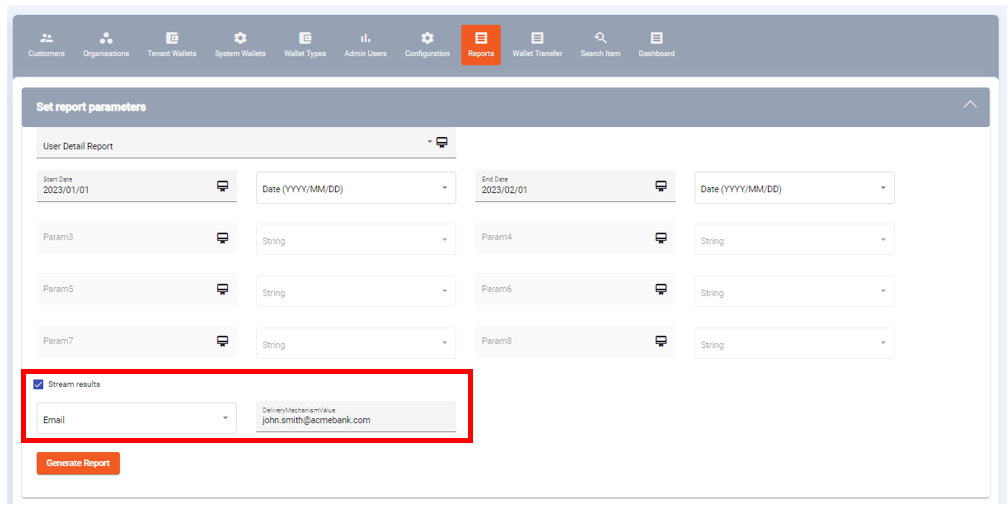
Report streaming in the Eclipse Admin Portal
Updated 5 months ago