
Loan Use Cases
Lending is a key capability in many fintech propositions. Eclipse, as a digital wallet and customer management platform, provides insights based on customer behavior and spending patterns, helping determine the appropriate lending amounts for each customer.
Eclipse offers a standard integration model for Loan Management System (LMS) providers, supports aggregation across multiple LMSs, and exposes all functionality through simple, consistent APIs. This allows tenants to offer a wide range of loan services through a single integration, covering the full loan lifecycle from origination to repayment.
The general loan management process includes the following stages:
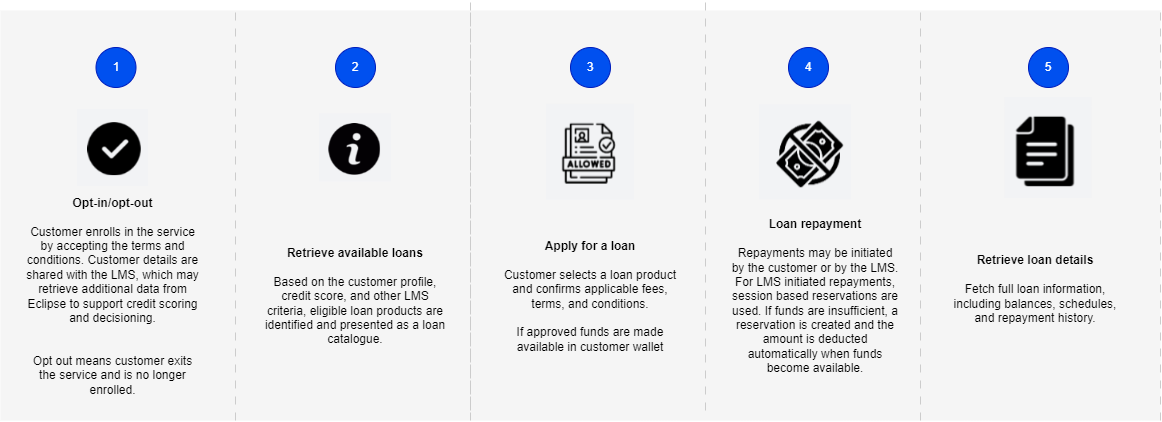
Loans: from origination to repayment
Prerequisites
Before using the loan APIs, ensure the following tenant configurations and permissions are set:
-
Permissions: LOAN.CREATE, LOAN.READ, LOAN.UPDATE, LOAN.DELETE assigned to users as required
-
Destination wallet: destination.wallet.config.{PROVIDER_NAME} set to the wallet ID where repayments should be received
-
Source wallet: source.wallet.config.{PROVIDER_NAME} set to the wallet ID used for disbursements (prefunded loan account)
-
Session-based transfers: enabledSessionBasedTransfer = true to allow LMS-initiated repayments
-
Loan catalog providers: tenant config config loan.catalog.providers set. Eclipse supports a dummy LMS for testing: use value com.ukheshe.services.loan.catalog.DummyCatalog
-
Optional LMS providers can call Eclipse to retrieve additional information for credit scoring (e.g. transaction history and documents) and also to initiate repayments and disbursements. LMS providers need to be provided with a identity (typically an INTEGRATOR role) with relevant permissions.
1. Customer Opt-In / Opt-Out
The opt-in step allows a customer to accept LMS terms and conditions. Customer information is sent to the LMS for credit scoring, and the LMS can retrieve additional information from Eclipse such as documents or transaction history.
API Reference: Opt-In
Example request:
POST /eclipse-conductor/rest/v1/tenants/{tenantId}/customers/{customerId}/loans/opt-in
{
    "walletId": 2516587,
    "provider": "DUMMY"
}
Example response:
{
    "id": 18,
    "externalCustomerId": "f2ef4735-db25-4603-a346-510a27d03032",
    "identityNumber": "6534556687903",
    "firstName": "Febrice Neba",
    "lastName": "Akosso",
    "phone": "27987654321",
    "walletId": "2516587",
    "credit_score": 770,
    "created": "2026-01-13T13:47:59.517Z",
    "status": "active",
    "creditScoreLastVerified": "2026-01-14T11:52:38.052Z",
    "additionalFields": []
}
This is also available for view in the Admin Portal under the Customer profile:

Opt-out removes the customer from the loans service.
API Reference: Opt-Out
Example request:
POST /eclipse-conductor/rest/v1/tenants/{tenantId}/customers/{customerId}/loans/opt-out
{
    "provider": "DUMMY"
}
Updated Status available under Customer profile in the Amin Portal:

2. Retrieve Loan Catalog
Once a customer has opted in, the LMS can retrieve available loans for that customer.
API Reference: Get Customer Loan Catalog
Example request
GET /eclipse-conductor/rest/v1/tenants/{tenantId}/loans/catalogs?catalogQuery=EclipseCustId={customerId}Example response:
[
    {
        "provider": "DUMMY",
        "products": [
            {
                "productId": "svsd",
                "productName": "sddf",
                "maxLoanAmount": 1000,
                "minLoanAmount": 1,
                "minInterestRate": 12,
                "additionalFields": [
                    {
                        "id": "termMonths",
                        "value": "12"
                    },
                    {
                        "id": "fees",
                        "value": "101"
                    },
                    {
                        "id": "currency",
                        "value": "null"
                    },
                    {
                        "id": "qualifyingCreditScore",
                        "value": "300"
                    },
                    {
                        "id": "validFrom",
                        "value": "2025-12-02"
                    },
                    {
                        "id": "validTo",
                        "value": ""
                    },
                    {
                        "id": "creditScoreAge",
                        "value": "2"
                    }
                ]
            }
        ]
    }
]
3. Apply for a Loan
After retrieving the catalog, the customer can apply for a loan. This can be done as a single-step or two-step process. The field submit must be set to true on the update (PUT) call for the loan to be sent to the LMS for approval.
API Reference: Apply for Loan
Single-Step
POST /eclipse-conductor/rest/v1/tenants/{tenantId}/customers/{customerId}/loans
{
    "walletId": 2496663,
    "externalUniqueId": "{{$guid}}",
    "provider": "DUMMY",
    "amount": 1000,
    "additionalFields": [
        {
            "id": "product_id",
            "value": "svsd"
        }
    ]
}
Example response:
{
    "customerId": 8689,
    "walletId": 2496663,
    "loanId": 501,
    "externalUniqueId": "ac77b047-fa33-44c4-921a-5c5d3bbd8641",
    "amount": 1000.000000,
    "status": "PENDING",
    "created": "2026-01-14T11:57:05.000Z",
    "additionalFields": [
        {
            "id": "product_id",
            "value": "svsd"
        },
        {
            "id": "customer_external_id",
            "value": "f2ef4735-db25-4603-a346-510a27d03032"
        },
        {
            "id": "msisdn",
            "value": "27987654321"
        }
    ]
}
Optional Two-Step
The loan application can be done as a 2 step process as additional information is gathered. In particular the loan can be created, and additional information added before updating.
- Create Loan
POST /eclipse-conductor/rest/v1/tenants/{tenantId}/customers/{customerId}/loans
{
    "walletId": 2496663,
    "externalUniqueId": "{{$guid}}",
    "provider": "DUMMY"
}- Submit Loan
The field submit must be set to true for this to be sent to the LMS for approval.
PUT /eclipse-conductor/rest/v1/tenants/{tenantId}/loans/{loanId}
{
    "additionalFields": [
        {
            "id": "product_id",
            "value": "svsd"
        }
    ],
    "submit": true,
    "amount": 1000
}
NoteEclipse supports 2 models for the actual disbursement of loan funds to the customer:
- Eclipse-Driven Disbursement to customer wallet
- LMS-Driven Disbursement to customer wallet
For full derails refer to Loan Disbursement Models
4. Repayments
Loan repayments can be initiated either by the customer, using the loan repayment endpoint, or by the LMS. When the LMS initiates a repayment, session-based transfers can be used. If there are insufficient funds in the customer’s wallet at the time of the request, a reservation is placed on the wallet and the amount is deducted automatically once sufficient funds become available.
4a. Customer-Initiated Repayment
Customers can repay loans using the repayment endpoint.
API Reference: Loan Repayment
POST /eclipse-conductor/rest/v1/tenants/{tenantId}/loans/{loanId}/repayment
{
  "provider": "DUMMY",
  "amount": 100,
  "paymentMethod": "wallet",
  "walletId": 2496663,
  "reference" : "XYZ"
}
NoteLMS providers can use Eclipse notifications to manage customer communications if needed.
4b. LMS-Initiated Repayment
The LMS can initiate repayment using session-based transfers. If insufficient funds exist in the wallet, a reservation is placed and the transfer occurs when funds are available.
Reference: Session-Based Transfer
Example request:
POST /eclipse-conductor/rest/v1/tenants/{tenantId}/wallets/transfers
{
    "amount": 50,
    "description": "Session-based reservation - loan payment of R50",
    "externalId": "session0005",
    "externalUniqueId": "session0005",
    "fromWalletId": 7864560888,
    "sessionId": "forceSessionBasedTransfer-session0005",
    "toWalletId": 7864560889
}
NoteThe sessionId must start with
forceSessionBasedTransfer-.
5. Loan Details and Transactions
5a. Get Loan Details
Retrieve details of a loan.
API Reference: Get Loan Details
Example request:
GET /eclipse-conductor/rest/v1/tenants/{tenantId}/loans/{loanId}Example response:
{
    "customerId": 85463274,
    "walletId": 2551077,
    "loanId": 512,
    "externalUniqueId": "63f29fb2-5c09-44cf-8345-d454858b35f2",
    "amount": 1500.000000,
    "interestRate": 12.500000,
    "fee": 150.000000,
    "provider": "DUMMY",
    "status": "APPROVED",
    "created": "2026-01-16T12:02:51.000Z",
    "additionalFields": [
        {
            "id": "product_id",
            "value": "SB003"
        },
        {
            "id": "customer_external_id",
            "value": "1e24d032-806e-45b5-a698-83b5d95fc787"
        },
        {
            "id": "msisdn",
            "value": "27963774692"
        },
        {
            "id": "loanApplicationResponse",
            "value": "{\"id\":64,\"amount\":1500,\"status\":\"active\",\"fees\":150,\"outstanding\":177.5,\"borrower_id\":20,\"product_id\":12,\"interest_rate\":12.5,\"term_months\":12,\"disbursement_date\":\"2026-01-16T12:02:51.778Z\",\"created_at\":\"2026-01-16T12:02:51.862Z\",\"total_repayable\":1837.5,\"next_payment_date\":\"2026-02-01T00:00:00.000Z\",\"next_payment_amount\":153.13}"
        }
    ]
}
5b. Get Loan Repayments
Retrieve all repayments for a loan.
API Reference: Get Loan Transactions
Example request:
GET /eclipse-conductor/rest/v1/tenants/{tenantId}/loans/{loanId}/transactionsExample response:
[
    {
        "transactionId": "110",
        "walletId": 2551077,
        "type": "cash",
        "date": "2026-01-21T15:22:33.902Z",
        "amount": 10,
        "description": "XYZ",
        "externalId": "XYZ",
        "info": []
    },
    {
        "transactionId": "109",
        "walletId": 2551077,
        "type": "bank_transfer",
        "date": "2026-01-21T15:21:36.578Z",
        "amount": 1000,
        "description": "ReWork",
        "externalId": "ReWork",
        "info": []
    },
    {
        "transactionId": "107",
        "walletId": 2551077,
        "type": "bank_transfer",
        "date": "2026-01-21T11:53:25.766Z",
        "amount": 500,
        "description": "NewTest2",
        "externalId": "NewTest2",
        "info": []
    },
    {
        "transactionId": "99",
        "walletId": 2551077,
        "type": "bank_transfer",
        "date": "2026-01-20T10:48:16.777Z",
        "amount": 50,
        "description": "paytest",
        "externalId": "paytest",
        "info": []
    }
]
NoteLoan repayments also appear as transactions on the customer wallet. This endpoint provides a consolidated view of all repayments from the LMS for a particular loan.
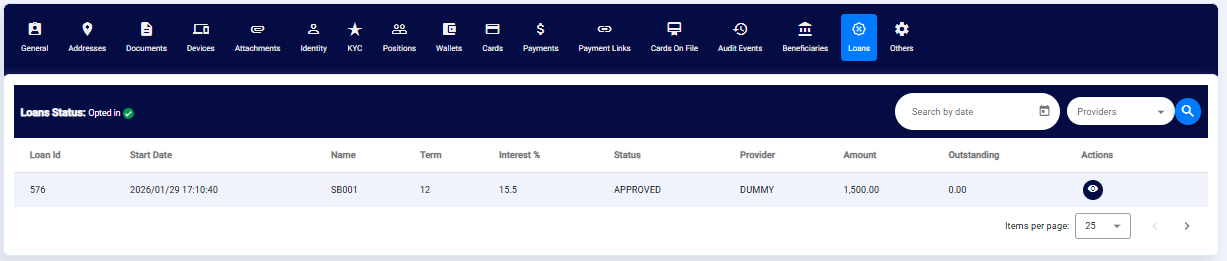
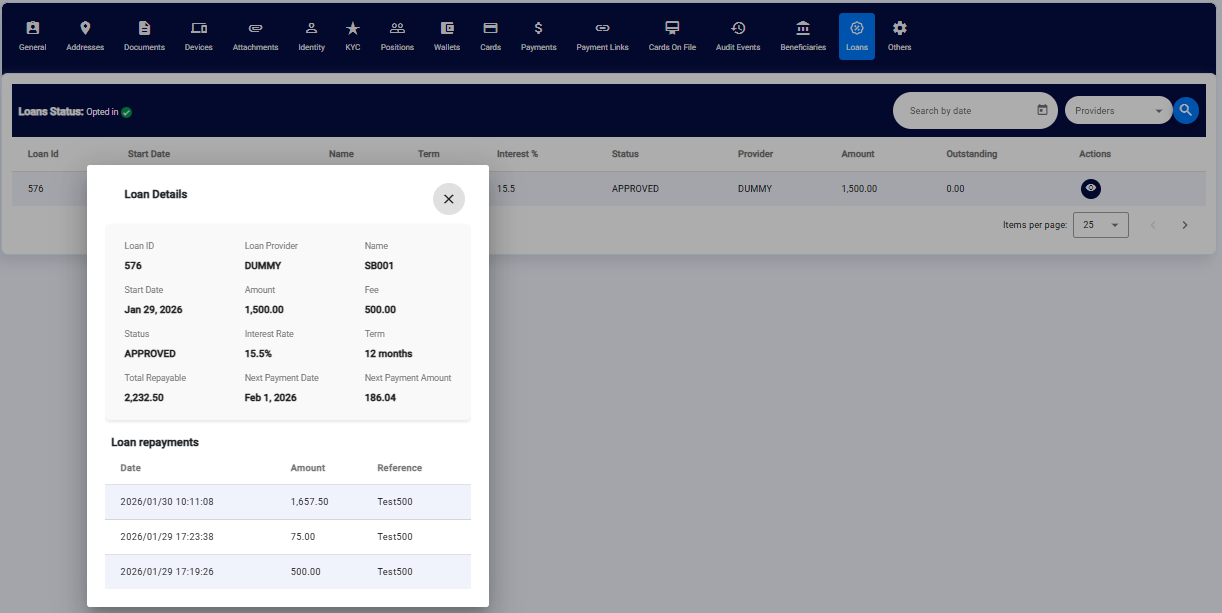
Loan Details and Repayment Information are also available in the Admin Portal:
Updated 5 months ago