
Accountable Institutions
As well as being a multi-tenanted platform, Eclipse can be configured as a white labelled service offering where multiple tenants can be grouped under an accountable institution. Administrators of that accountable institution can create, administer and support all tenants within their institution. Certain assets can be also be custom branded e.g. the Admin Portal and email communications.
In this scenario tenants and admin users are created under an institution. Admin users created under an institution have the same capabilities as an EFT Corporation global user but can only administer the tenants owned by that accountable institution.
In this way institution administrators can perform all the relevant tasks needed to support their tenants while enjoying the scalability, availability and simplicity of the shared Eclipse cloud native SaaS platform.
Institution Role Hierarchy
Institution roles mirror the EFT Corporation global role hierarchy. The table below maps each institution role to its equivalent global role and summarises its intended responsibilities:
| Institution Role | Global Equivalent | Typical Responsibilities |
|---|---|---|
| INSTITUTION_ADMIN | GLOBAL_ADMIN | Full administration of all tenants within the institution |
| INSTITUTION_FINANCE_L_1 | GLOBAL_FINANCE_L_1 | Read-only access to financial data and reports |
| INSTITUTION_FINANCE_L_2 | GLOBAL_FINANCE_L_2 | Financial operations (transfers, fee adjustments) |
| INSTITUTION_FINANCE_L_3 | GLOBAL_FINANCE_L_3 | Elevated financial operations including reversals |
| INSTITUTION_TECH_SUPPORT | GLOBAL_TECH_SUPPORT | Technical configuration and integration support |
| INSTITUTION_SUPPORT_L_1 | GLOBAL_SUPPORT_L_1 | Frontline customer/merchant support (read access) |
| INSTITUTION_SUPPORT_L_2 | GLOBAL_SUPPORT_L_2 | Elevated support — can perform limited write operations |
| INSTITUTION_SUPPORT_L_3 | GLOBAL_SUPPORT_L_3 | Senior support — can action most operational tasks |
| INSTITUTION_INTEGRATOR | GLOBAL_INTEGRATOR | API integration access for system-to-system calls |
Important: Institution roles are scoped to tenants belonging to that institution. An
INSTITUTION_ADMINfor institutionONSAcannot administer tenants belonging to institutionDTB.
Create a Tenant under an Institution
To create a tenant under an institution you need to set the institution field when calling the create tenant endpoint:
The institution field must be set to the institution's short code (e.g. ONSA, DTB). This determines which institution administrators can manage the tenant. The institution code is assigned by EFTCorp during institution setup.
POST /eclipse-conductor/rest/v1/tenants
{
  "companyNumber": "DT1234",
  "email": "[email protected]",
  "industrialClassification": "icc",
  "industrialSector": "iss",
  "institution": "ONSA",
  "name": "Test ",
  "phone1": "9222913437",
  "taxNumber": "T0385848",
  "tradingName": "Tests"
}{
"companyNumber": "DT1234",
"email": "[email protected]",
"industrialClassification": "icc",
"industrialSector": "iss",
"institution": "ONSA",
"name": "Test ",
"phone1": "9222913437",
"taxNumber": "T0385848",
"tradingName": "Tests",
"version": 0
}Create Institution Admin user
To create an institution admin user you need to set the institution field and specify an institution role in the role field when calling the create admin user endpoint:
POST URL: {baseURL}/rest/v1/global/admin-users
Content-Type: application/json
{
  "firstName":"user1",
  "email": "[email protected]",
  "identity": "user1",
  "institution": "ONSA",
  "lastName": "Eftcorp",
  "password": sadmsdsla#@#@",
  "phone1": "9494949494",
  "role": "INSTITUTION_ADMIN",
}{
"adminUserId": 1,
"email": "[email protected]",
"firstName":"user1",
"identity": "user1",
"institution": "ONSA",
"lastName": "Eftcorp",
"phone1": "9494949494",
"role": "INSTITUTION_ADMIN"
}
NoteInstitution roles mirror EFT Corporation global roles but at an institution level:
- INSTITUTION_ADMIN, INSTITUTION_FINANCE_L_1, INSTITUTION_FINANCE_L_2, INSTITUTION_FINANCE_L_3, INSTITUTION_TECH_SUPPORT, INSTITUTION_SUPPORT_L_1, INSTITUTION_SUPPORT_L_2, INSTITUTION_SUPPORT_L_3, INSTITUTION_INTEGRATOR
This can be done in the Eclipse Admin Portal by INSTITUTION_ADMIN users:
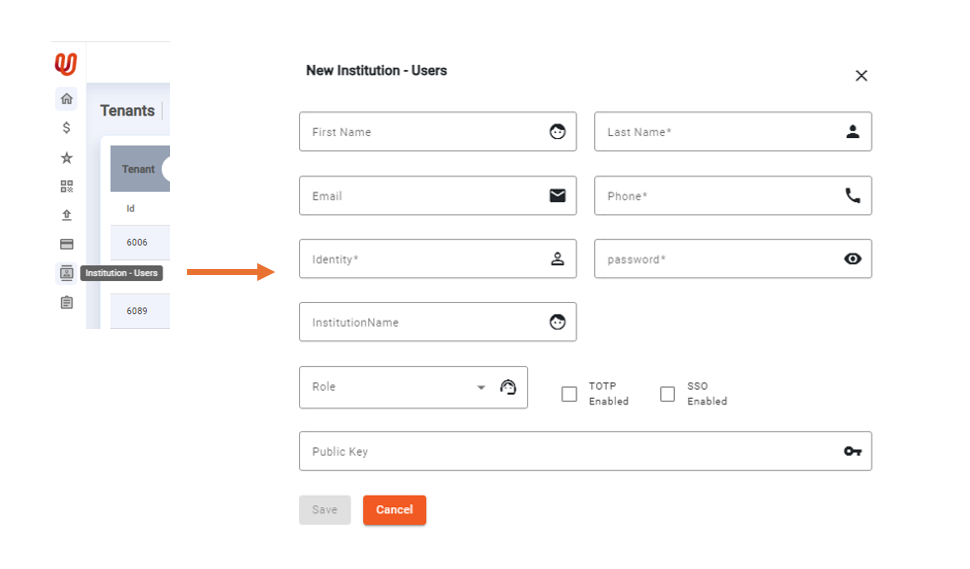
Add Institution Users in the Eclipse Admin Portal
Shared Permissions Across Institution Tenants
A key advantage of the institution model is the ability to define permissions once and apply them consistently across all tenants. See the Permissions Management section for how to set up global.permissions.shared properties and link them to tenants via the SharedPermissionsConfig tenant config key.
Golden Customer Lookup
When the same individual is a customer across multiple tenants within an institution (for example, the same person enrolled in two separate tenant programmes under the same institution), Eclipse provides a single cross-tenant lookup that deterministically selects the most current customer profile and the most recently updated address across all matching records. This is the golden customer endpoint.
GET /eclipse-conductor/rest/v1/institutions/{institutionId}/golden-customersParameters
| Parameter | Type | Required | Description |
|---|---|---|---|
institutionId | Path | Yes | Institution short code (e.g. ONSA, DTB) |
nationalIdentityNumber | Query | Conditional | National identity number to match. At least one of nationalIdentityNumber or passportNumber must be provided. |
passportNumber | Query | Conditional | Passport number to match. At least one of nationalIdentityNumber or passportNumber must be provided. |
If both nationalIdentityNumber and passportNumber are supplied, customers matching either identifier are included in the candidate set.
Selection Logic
Golden customer: All customers across all tenants in the institution whose nationalIdentityNumber or passportNumber matches are ranked by:
next_mandatory_kyc_datedescending — the customer with the furthest-future KYC renewal date wins (most current KYC status)last_modifieddescendingcreateddescendinguser_iddescending (deterministic tiebreaker)
The highest-ranked customer is returned as the golden customer.
Golden address: The most recently updated address is selected from all addresses belonging to all matched customers. The golden address is embedded in the address field of the response. This field is only populated by this endpoint — standard customer endpoints do not embed an address.
Example
GET /eclipse-conductor/rest/v1/institutions/ONSA/golden-customers?nationalIdentityNumber=9403141XXXX
Authorization: Bearer {jwt}{
"customerId": 12345,
"firstName": "Jane",
"lastName": "Smith",
"nationalIdentityNumber": "9403141XXXX",
"status": "ACTIVE",
"nextMandatoryKycDate": "2027-03-01T00:00:00Z",
"tenantId": 101,
"address": {
"addressId": 6789,
"customerId": 12346,
"addressType": "PHYSICAL",
"line1": "12 Example Street",
"city": "Cape Town",
"state": "Western Cape",
"country": "ZA",
"code": "8001",
"version": 0
}
}
NoteThe
addressin the response may belong to a different customer than thecustomerIdreturned — it is the most recently updated address across all matched customers in the institution, regardless of which tenant they belong to.
Error Responses
| HTTP Status | Condition |
|---|---|
400 Bad Request | Neither nationalIdentityNumber nor passportNumber was supplied |
400 Bad Request | The institutionId does not correspond to any known tenants |
404 Not Found | No customer matching the supplied identifier(s) was found within the institution |
Institution-Branded Admin Portal
Institutions can apply custom branding (logo, colours, email templates) to the admin portal for all their tenants. See Eclipse Admin Portal Configuration for the public.institution.adminportal.<hostname> property and the full list of theme keys.
Updated 5 months ago