
Eclipse Initiated Notifications (Webhooks)
There are certain circumstances under which Eclipse will initiate API calls to a tenant's domain. Typical examples include notification of transactions on a particular store-of-value within Eclipse, or in cases where the Eclipse wallet is a facade to an external SoV on the tenant's platform and an API call is needed to authorise a debit or a credit. This section describes the typical use cases, how they are configured, and their corresponding payloads.
Security
It must be noted that all calls to 3rd party platform in these use cases will have an Eclipse-Signature header, as described in the 'Encryption and Integrity section''. It is vital that all tenant endpoints implement a check to be sure all their endpoints expecting calls from Eclipse are from Eclipse before processing them.
Source IP Addresses
Callbacks / webhooks (from Eclipse) in case tenants wish to whitelist incoming requests from Eclipse, are as follows:
79.125.40.127
54.220.185.240
18.134.2.182
3.11.195.109
For Sandbox, the source IP for callbacks / webhooks is:
34.255.93.65
Header Support
Eclipse supports the inclusion of custom HTTP headers in webhook requests. These headers can be configured using the tenant property webhookAdditionalHeaders. This property accepts a comma-delimited string in the following format:key1,value1,key2,value2.
Wallet Movement Notification
This webhook is triggered to a 3rd party URL for all movements on a wallet based on the wallet's configuration, as specified by it's type and type configuration. For every wallet, there is an associated wallet-type. Each wallet-type can have a configuration parameter called, 'walletMovementWebhookUrl' which can be populated with any URL that Eclipse is able to call. A screenshot illustrating this config can be seen below.
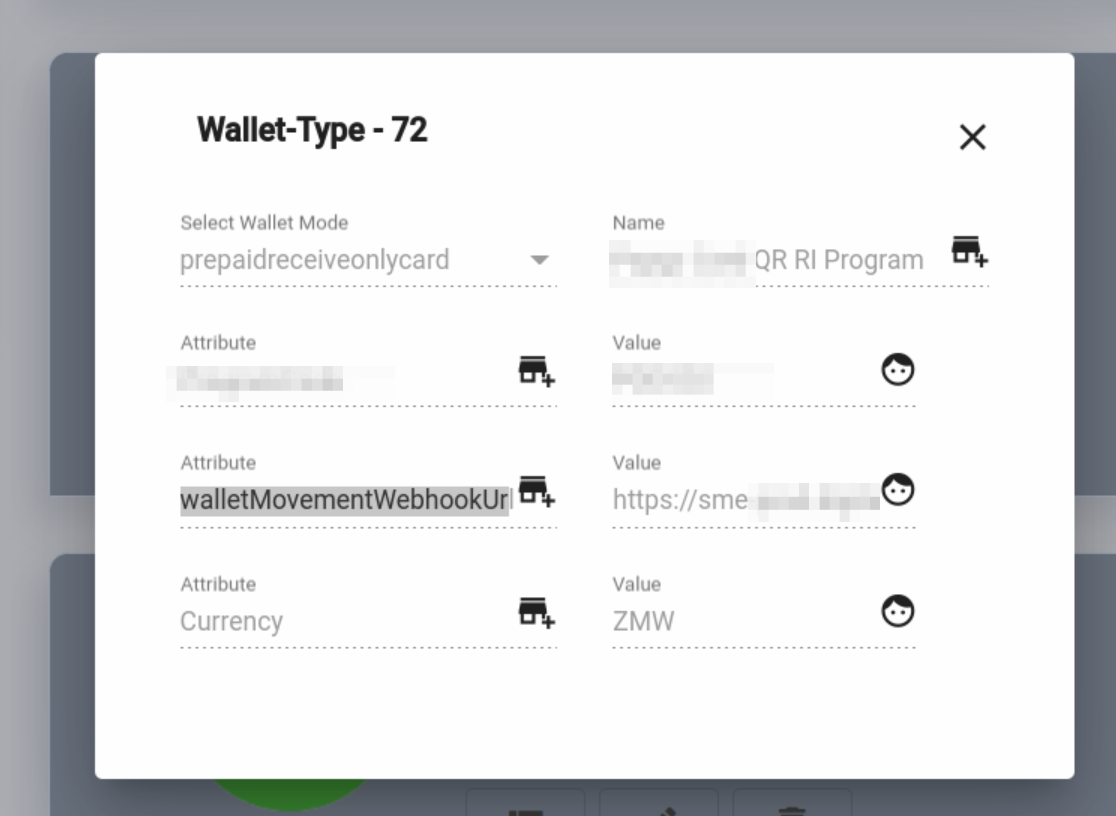
It is important to note that this API call is performed once only. Eclipse will asynchronously send the request and will not retry if the API call fails.
In some cases where the transfer uses eventual consistency (such as digital to PTS card wallets), the notification can be sent before PTS has updated its balance. To avoid this, a delay can be configured on the wallet type so that any notifications for that wallet type are delayed. This is set via 'walletMovementWebhookDelayMs' and can be set on PTS wallet types to something like 3000 so that the notification happens 3 seconds after the transaction and gives time for PTS to be aware of the transaction.
An example of the payload for a credit transaction is as follows:
{
  "transactionId": "WH-20240315-0042",
  "walletId": 51588,
  "type": "Cr",
  "date": "2024-03-15T10:23:45.000+02:00",
  "amount": 250.00,
  "fee": 2.50,
  "currency": "ZAR",
  "balance": 1250.00,
  "description": "Payment from Thabo Nkosi",
  "authorisationCode": "CBHVYZ",
  "externalId": "TFR-20240315-0042",
  "externalUniqueId": "baff409432820bee9092f49147a704f0",
  "otherWalletId": 51200,
  "location": "105.233.41.30"
}
An example of the payload for a debit transaction:
{
  "transactionId": "WH-20240315-0043",
  "walletId": 51588,
  "type": "Dr",
  "date": "2024-03-15T11:05:00.000+02:00",
  "amount": -100.00,
  "fee": 1.50,
  "currency": "ZAR",
  "balance": 1148.50,
  "description": "Airtime purchase - Vodacom",
  "externalId": "VAS-20240315-8821",
  "externalUniqueId": "c3e1d09f88a34b2e901f5c2d7b34aa1e"
}
A description of all payload fields is as follows:
| Field | Type | Mandatory | Description |
|---|---|---|---|
transactionId | String | Yes | Unique identifier for the transaction generated by the wallet/card system |
walletId | Long | Yes | The ID of the wallet on which the transaction occurred (must be positive) |
type | String | No | Transaction type: Cr for credit, Dr for debit |
date | ISO 8601 DateTime | No | Timestamp of the transaction, including timezone offset |
amount | Decimal | No | Transaction amount in major currency units. Negative for debits, positive for credits |
fee | Decimal | No | Additional fee charged as part of the transaction (always positive) |
currency | String | No | ISO 4217 currency code, e.g. ZAR, USD, NGN |
balance | Decimal | No | Closing balance of the wallet after the transaction, in the wallet's currency |
description | String | No | Human-readable description of the transaction |
authorisationCode | String | No | Authorisation code for card transactions |
externalId | String | No | External identifier for the transaction, used for reconciliation. Need not be unique |
externalUniqueId | String | No | Externally provided unique identifier for the transaction |
otherWalletId | Long | No | For transfers, the ID of the other wallet that was debited or credited |
location | String | No | Location of the transaction, typically an IP address or GPS coordinate |
Wallet Movement SMS and Email Notifications
Eclipse offers a straightforward way to configure SMS and Email notifications for both successful and failed wallet transactions. In the case of SMS, the message will be sent to the phone number of the user associated to the particular wallet. For email the email address of the user associated to the particular wallet will be used.
Configuration Parameters
Wallet types can be configured with parameters:
- walletMovementSMSTemplate – Specifies the global property that defines the Mustache template used for SMS notifications on successful transactions.
- failedWalletMovementSMSTemplate – Specifies the global property that defines the Mustache template used for SMS notifications on failed transactions.
- walletMovementEmailTemplate – Specifies the global property that defines the Mustache template used for Email notifications on successful transactions.
- failedWalletMovementEmailTemplate – Specifies the global property that defines the Mustache template used for Email notifications on failed transactions.
NoteMustache templates for SMS and Email support basic text substitution. For more advanced logic (e.g. conditionals), you can use the Handlebars variant by specifying #Type:Handlebars in the template header.
The following data fields are available for use in the SMS and Email mustache templates:
| Field | Description |
|---|---|
| amount | Amount of the related transaction |
| balance | Balance of the wallet being transacted on |
| currency | Currency of the related transaction |
| date | Date of the transaction |
| description | The description of the transaction |
| externalId | The externalId field of the transaction |
| externalUniqueId | The externalUniqueId field of the transaction |
| location | Location of the transaction |
| otherWalletId | The destination wallet ID of the transaction |
| type | The transaction type |
| walletId | The wallet being transacted on |
| transactionId | The ID of the transaction |
Example simple mustache template for walletMovementSMSTemplate:
#UrlDataSource: wallet=/rest/v1/wallets/{{#round0}}{{data.otherWalletId}}{{/round0}}
#UrlDataSource: user=/rest/v1/users/{{#round0}}{{wallet.userId}}{{/round0}}
#To: {USER.PHONE1}
Your wallet {{data.friendlyId}} has had a transaction of R{{#round0}}{{data.amount}}{{/round0}} .
Your closing balance is R{{#round0}}{{data.balance}}{{/round0}}
Example complex mustache template for walletMovementSMSTemplate to have a different message for credit and debit transactions:
#Type:Handlebars
#UrlDataSource: wallet=/rest/v1/wallets/{{data.walletId}}
#UrlDataSource: user=/rest/v1/users/{{wallet.userId}}
#To: {USER.PHONE1}
<property>custom.sms.header.property</property>

{{#if (gt data.amount 0)}}
       You received R{{data.amount}}. Your account's available balance is R{{data.balance}}.
{{else}}
	You sent R{{data.amount}}. Your account's available balance is R{{data.balance}}.
{{/if}}

<property>custom.sms.footer.property</property>
Example complex mustache template for walletMovementSMSTemplate to only send SMS for credit transactions:
#Type: Handlebars
#Skip: {{#unless data.isCreditTransaction}}true{{/unless}}
#UrlDataSource: wallet=/rest/v1/wallets/{{data.walletId}}
#UrlDataSource: user=/rest/v1/users/{{wallet.userId}}
#To: {USER.PHONE1}
Your wallet {{wallet.friendlyId}} has been topped up with R{{data.amount}}. Your account's available balance is R{{data.balance}}.
Example simple mustache template for failedWalletMovementSMSTemplate:
#UrlDataSource: wallet=/rest/v1/wallets/{{#round0}}{{data.walletId}}{{/round0}}
#UrlDataSource: user=/rest/v1/users/{{#round0}}{{wallet.userId}}{{/round0}}
#To: {USER.PHONE1}
Dear client, your payment of R{{#round0}}{{data.amount}}{{/round0}} at {{data.location}} was declined due to {{data.description}}.
Example mustache template for walletMovementEmailTemplate:
#Type: Handlebars
#UrlDataSource: wallet=/rest/v1/wallets/{{data.walletId}}
#UrlDataSource: user=/rest/v1/users/{{wallet.userId}}
#UrlDataSource: organisation=/rest/v1/organisations/{{wallet.organisationId}}
#From: ++comms.email.address++
#To: {{#if wallet.userId}}{USER.EMAIL1}{{else}}{{organisation.email}}{{/if}}
#Subject: Payment transaction
  <p></p>
Wallet Movement Authorization
Related to wallet movement notifications is the ability to send debit notifications to the tenant for authorization before the debit is processed. If the tenant does not authorize the transaction, Eclipse will roll back any ledger changes. This supports the use case where a tenant maintains their own ledger and needs it to mirror the Eclipse wallet ledger with synchronous confirmation.
There are two wallet-type configuration parameters that apply to this scenario:
1. preDebitTenantAuthUrl — URL that Eclipse will POST to with the details of any transfer debit from the wallet. Eclipse will only proceed with the transaction if an HTTP response code less than 300 is returned. The call must return within 3 seconds (the request timeout). The tenant's URL path must include the string eclipseauthrequest.
Example: https://mybank.co.za/eclipseauthrequest/wallet-auth
The payload POSTed to the preDebitTenantAuthUrl follows the same wallet movement notification format described above. The tenant must respond with HTTP 200 to approve or any 4xx/5xx to decline the debit.
POST https://mybank.co.za/eclipseauthrequest/wallet-auth

{
  "transactionId": "PRE-20240315-0051",
  "walletId": 51588,
  "type": "Dr",
  "amount": -500.00,
  "currency": "ZAR",
  "description": "Transfer to wallet 51200",
  "otherWalletId": 51200,
  "externalUniqueId": "d4f8a2b1c9e04f3e8a7b6d5c4e3f2a1b"
}
2. preDebitTenantAuthSkipForUserId — Transfers initiated by this userId will bypass the preDebitTenantAuthUrl check even when it is configured. Use this for the tenant's own system user to avoid a redundant back-to-back authorization on tenant-initiated transfers.
Event Driven Notifications
In addition to the notifications mentioned above, Eclipse provides a comprehensive event-driven notification framework, enabling notifications to be triggered by any event within the ecosystem.
This can be used for a wide range of use cases:
- Dynamic customer notifications across multiple channels, based on ecosystem events.
- Streaming events to external systems (e.g., SIEM, analytics platforms).
The framework works as follows:
- Eclipse publishes events for all activities within the ecosystem into the events framework
- Third parties can also publish events for all activities
- Notification listeners and notification templates can be configured per tenant - this defines what events should trigger which notifications
- Mustache or handlebar templates can be used to send notifications
- Handlers exist for SMS, Email, Push notifications and HTTP
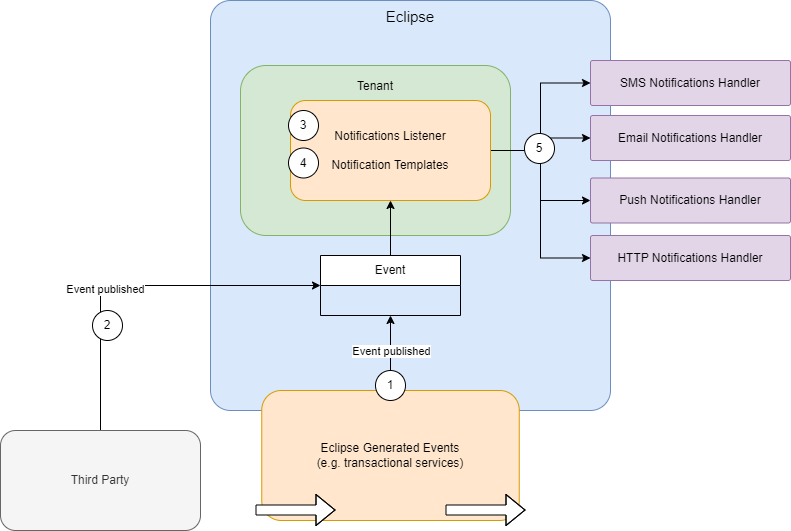
Prerequisites:
- Tenant config eventPublishers - (default value in global property: impl.event.publishers). This property uses regex to define which events trigger notifications for this tenant.
^(wallet\.history\.create|wallet\.transfer\.create|payment\.payment\.complete|postilion\.card\.update)$=com.ukheshe.eclipse.conductor.listener.EclipseEventNotificationListenerThis configuration will trigger notifications for the following events:
- wallet.history.create
- wallet.transfer.create
- payment.payment.complete
- postilion.card.update
- Tenant config events.notification.template.{event_name} - this property defines the mustache or handlebars template to send the notification. Note this supports the unified Handlebars template to dynamically send notifications based on preferences.
Example
To send dynamic notifications to a customer depending on the customer communication preference for all wallet history events (i.e. any transaction that affects the wallet balance).
- Set tenant config impl.event.publishers to match wallet.history.create:
^(wallet\.history\.create)$=com.ukheshe.eclipse.conductor.listener.EclipseEventNotificationListener- Set tenant config events.notification.template.wallet.history.create to the template to use to send the notifications:
walletMovementTemplate- Define the handlebar template in global property handlebar.template.{tenantId}.walletMovementTemplate:
#Type: Handlebars
#UrlDataSource: user=/rest/v1/users/{{data.userId}}

{{#if (or (eq user.communicationPreference "SMS") (eq user.communicationPreference null))}}
  #SMS-Start
  #To: {USER.PHONE1}
  This is the sample SMS. Sent by {{data.sender}}
  #SMS-End
{{/if}}

{{#eq user.communicationPreference "EMAIL"}}
  #Email-Start
  #From: ++comms.email.address++
  #To: {USER.EMAIL1}
  #Subject: dev-test-template-1
  This is Sample email Template. Sent by {{data.sender}}
  #Email-End
{{/eq}}

{{#eq user.communicationPreference "PUSH"}}
  #PushNotification-Start
  This is the PushNotification template Sent by {{data.sender}}
  #PushNotification-End
{{/eq}}
Sending Events Over HTTP
The events framework can publish events not only to the notifications framework for templating and sending emails and SMS etc, but can be used in a more raw form to send events to tenants in plain JSON. A primary use case of this is to publish Eclipse events to a SIEM (Security Information and Event Management). Again the same impl.event.publishers property (or eventPublishers tenant config) can be used to indicate what events must be analysed to send to tenants. E.g.:
.*=com.ukheshe.arch.impl.event.HttpUrlPerTenantEventPublisherThen on the tenant config, set property eventWebhookUrl:
https://mybank.com/siem/eventsYou can also define a list of URLs and regex's for which events to send to which URL:
postilion.card.create|postilion.card.update=https://webhook.site/7d07ec2a-0920-4347-9d1b-6ef1dc317202,.*=https://webhook.site/232a1d07-6913-4e39-9bea-054a74f0d55eEvents sent over HTTP follow the structure below:
{
  "eventType": {
    "type": "string",
    "description": "Type of the event, e.g. user.organisation.create"
  },
  "traceId": {
    "type": "string",
    "description": "Unique trace identifier for tracking the event"
  },
  "tenantId": {
    "type": "integer",
    "description": "Tenant identifier related to the event"
  },
  "created": {
    "type": "string",
    "format": "date-time",
    "description": "Timestamp when the event was created"
  },
  "data": {
    "type": "object",
    "description": "Event-specific payload"
  },
  "serverId": {
    "type": "string",
    "description": "Unique identifier of the server where the event originated"
  },
  "serverIp": {
    "type": "string",
    "format": "ipv4",
    "description": "IP address of the server where the event originated"
  },
  "instigator": {
    "type": "object",
    "description": "Details of the user or system that initiated the event",
    "properties": {
      "identity": { "type": "string" },
      "roles": {
        "type": "array",
        "items": { "type": "string" }
      },
      "positions": {
        "type": "array",
        "items": {}
      },
      "userId": { "type": "integer" },
      "locale": { "type": "string" },
      "remoteAddr": { "type": "string", "format": "ipv4" },
      "sessionId": { "type": "string" },
      "source": { "type": "string" },
      "attributes": { "type": "object" },
      "scope": {
        "type": "array",
        "items": {}
      },
      "system": { "type": "boolean" },
      "anonymous": { "type": "boolean" }
    },
    "required": [
      "identity",
      "roles",
      "userId",
      "locale",
      "remoteAddr",
      "sessionId",
      "source",
      "system",
      "anonymous"
    ]
  },
  "threadName": {
    "type": "string",
    "description": "Thread name on which the event was processed"
  },
  "softwareVersion": {
    "type": "string",
    "description": "Version of the software handling the event"
  },
  "associatedEntityId": {
    "type": "string",
    "description": "Identifier of the entity associated with the event"
  },
  "associatedEntityType": {
    "type": "string",
    "description": "Type of the entity associated with the event, e.g. organisation"
  },
  "schemaVersion": {
    "type": "integer",
    "description": "Version of the schema used for this event"
  }
}
Example event for a newly created organisation:
{
  "eventType": "user.organisation.create",
  "traceId": "baab12a7dfbd1e1cc4f56c796706613f",
  "tenantId": 11224145,
  "created": "2025-08-12T10:23:17.757Z",
  "data": {
    "organisation": {
      "organisationId": 11245917,
      "name": "Test",
      "phone1": "1234567890",
      "status": 1,
      "externalId": "e2df5a70-4461-4e38-b45c-320258b41226",
      "created": "2025-08-12T10:23:18.000Z",
      "lastModified": "2025-08-12T10:23:18.000Z",
      "version": 0,
      "bankDetails": [],
      "organisationAddresses": [],
      "organisationDocuments": [],
      "tenantId": 11224145,
      "preferences": []
    }
  },
  "serverId": "e5b7c655-302c-4709-ad78-f867ce36b28d",
  "serverIp": "172.31.34.124",
  "instigator": {
    "identity": "[email protected]",
    "roles": [
      "GLOBAL_ADMIN"
    ],
    "positions": [],
    "userId": 28603,
    "locale": "en-US",
    "remoteAddr": "105.233.41.30",
    "sessionId": "e69a8767-ab47-44f3-8cdc-e168c41b0a31",
    "source": "Auth-RP",
    "attributes": {},
    "scope": [],
    "system": false,
    "anonymous": false
  },
  "threadName": "v-quarkus-905",
  "softwareVersion": "sandbox.6aa6dd9.2025-08-12T10-17-13",
  "associatedEntityId": "11245917",
  "associatedEntityType": "organisation",
  "schemaVersion": 1
}
Consolidated Callbacks for Unsolicited Deposits/Payments
For longer running transactions like payments, topups and withdrawals callbacks on transaction completion including transaction details and status are important for tenants to receive. Typically for tenant initiated payments, withdrawals or topups a callback URL can be specified by the tenant when initiating that transaction and the full transaction object is posted to that URL when the transaction completes.
However there are certain transactions that are not tenant initiated, that tenants would also like to be notified on - for example an EFT payment into a wallet or a QR code payment into a wallet.
To be notified on any unsolicited deposits/payments (e.g. an EFT payment is done into a wallet, or a QR code is paid into a wallet), the completed transaction object can be posted to a URL. This URL can be set at an organisation level by including an attachment of type consolidatedCallbacks that specifies the notification URL. If the payment is for a wallet associated to that organisation then the notification will be sent to that URL. Alternatively this can be set at a tenant level by setting tenant configuration consolidatedCallbacks to the specific URL.
POST /eclipse-conductor/rest/v1/tenants/{tenantId}/organisations/{organisationId}/attachments
{
  "attachmentType": "consolidatedCallbacks",
  "mediaType": "text/plain",
  "type": "consolidatedCallbacks",
  "info": "https://webhook.site/91368c6c-6581-4434-9500-06ae5d36694b"
}
An example of the payload for the callback when an EFT payment is done is as follows:
{
  "externalUniqueId": "+VNp9bmNHwnjjskFPTWInv2aUD2rg/HYGjqPRHWQ8vU=",
  "walletId": 3129,
  "amount": 10.000000000,
  "created": "2023-11-01T09:26:00Z",
  "paymentReference": "JVAHS6G3",
  "fee": 0.10000000000000000000000000000,
  "description": "JVAHS6G3",
  "retrievalReferenceNumber": 0,
  "paymentType": "ATM",
  "paymentId": 10491,
  "customerId": 3761,
  "currency": "ZAR",
  "status": "SUCCESSFUL"
}
An example of the payload for the callback when a QR payment is done is as follows:
{
  "paymentId": 74881,
  "externalUniqueId": "MP-IN-4589207-SUCCESS",
  "status": "SUCCESSFUL",
  "amount": 100.00,
  "description": "QR Code Payment",
  "currency": "ZAR",
  "additionalFields": [],
  "acceptedCardSchemes": [],
  "cardPhone": "+27826999279",
  "phone": "+27826999279",
  "acceptedPaymentMechanisms": [],
  "paymentType": "CARD",
  "authCode": "AUTH123",
  "retrievalReferenceNumber": 809260,
  "created": "2024-03-15T10:26:59.000+02:00",
  "paymentData": "6244523710",
  "paymentInstrumentInfo": {
    "cardBin": "424242",
    "cardType": "CREDIT",
    "cardLast4": "4242",
    "cardName": "T NKOSI",
    "cardPhone": "+27826999279"
  },
  "fee": 0.00,
  "paymentReference": "7165124d-5e53-49b6-b644-b3474c8d6ccb",
  "walletId": 204149,
  "organisationId": 11869,
  "associatedPaymentId": 74878,
  "gatewayTransactionId": "MP-IN-4589207-SUCCESS"
}
Updated 3 months ago