
System Wallets
System wallets are set up and managed exclusively by the EFT Corporation team. They handle specific internal payment flows, fee collection, and settlement operations on the platform.
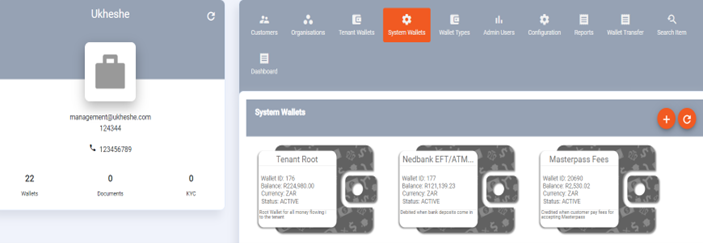
Types of System Wallets
| Wallet Type | Purpose |
|---|---|
| Source System Wallet | The funding source for platform-initiated operations |
| Destination System Wallet | The receiving wallet for platform-initiated operations |
| Fees System Wallet | Collects all transaction fees charged to customers (excluding card fees) |
| Suspense Wallets | Hold funds in transit during settlement or reconciliation |
| Treasury Wallets | Hold funds per currency for cross-tenant operations |
NoteSystem wallets cannot be modified by tenant admin users. Balances on these wallets are maintained by EFT Corporation. Contact [email protected] if you have questions about a specific system wallet balance.
Viewing System Wallets
Navigate to Wallets > System Wallets to view all system wallets configured for the platform. For each wallet you can see the wallet ID, balance, currency, and purpose.
System Wallet Tabs
Clicking on a system wallet opens its profile with the following read-only tabs:
| Tab | Description |
|---|---|
| General | Wallet name, balance, status, currency, wallet type |
| Transaction History | Full transaction ledger (date-filterable, max 30-day range) |
| Top-Ups | Incoming funding history |
| Withdrawals | Outbound movement history |
| Remittance | Cross-border transfers from this wallet |
| QR Codes | Any QR codes linked to this system wallet |
| Transfers | Transfer history; initiate system-level transfers (requires elevated permissions) |
| Reservations | Funds in transit or pending settlement |
| Scheduled Withdrawals | Any recurring jobs scheduled against this wallet |
| Audit Events | Full event history — every state change and transaction |
| Attachments | Supporting documents attached to the wallet |
Tenant admin users can view system wallet activity but cannot modify system wallet settings or statuses. Only EFT Corporation staff with GLOBAL_ADMIN access can change system wallet configuration.
Updated 5 months ago