
Reports API
How to call the Eclipse Reports API — endpoint, parameters, output formats, response handling, and admin portal walkthrough.
The Reports API provides programmatic access to any report configured on your Eclipse tenant. Reports are identified by a reportId string and accept typed query parameters that are passed through to the underlying SQL query.
Endpoint
GET /eclipse-conductor/rest/v1/tenants/{tenantId}/reports/{reportId}
Authorization: Bearer {jwt}Query Parameters
Parameters are typed and positionally named. Each report uses a subset of them — see the Standard Reports catalogue for exactly which parameters each report expects.
| Parameter | Type | Description |
|---|---|---|
d1–d8 | String | Date filters. ISO 8601 format: YYYY-MM-DDTHH:mm:ss.SSS |
s1–s20 | String | String filters — status codes, identifiers, names |
n1–n8 | Double | Numeric filters — accepts decimal values |
format | String | Output format: json (default), csv, xml, or xls |
streamResult | Boolean | Set to true to generate the report asynchronously. Returns 204 immediately; report is delivered when ready. Default: false |
deliveryMechanismType | String | Delivery channel for async reports. Values: email, http, or jira. Required when streamResult=true |
deliveryMechanismValue | String | The email address, callback URL, or Jira reference for delivery. Required when streamResult=true |
NoteThis endpoint does not accept
organisationIdas a query parameter. To scope a report to a single organisation, call the organisation-scoped endpoint instead:GET /eclipse-conductor/rest/v1/tenants/{tenantId}/organisations/{organisationId}/reports/{reportId}. It accepts the samed#/s#/n#/format/async parameters, withorganisationIdas a path segment rather than a query parameter.
Response Behaviour
| Scenario | HTTP Status | Body |
|---|---|---|
| Results returned | 200 OK | Report data in the requested format |
| Query returned no rows | 200 OK | Empty array [] (json), or header-only output for csv/xml/xls |
streamResult=true submitted | 204 No Content | Empty — report delivered asynchronously when ready |
NoteA small number of internal, non-SQL report types return
204 No Contentinstead of an empty body when there are no results. This does not apply to standard SQL-backed reports such as those in the Standard Reports catalogue.
NoteSynchronous requests have a 15-second timeout. If your report regularly hits this limit, use Asynchronous Report Delivery instead.
Output Formats
The format parameter controls how the response body is serialised.
| Value | Content-Type | Notes |
|---|---|---|
json | application/json | Default. Returns a JSON array of objects |
csv | text/csv | Comma-separated, with a header row |
xml | application/xml | XML document |
xls | application/vnd.ms-excel | Excel workbook — useful for direct download |
Examples
Fetch the Digital Wallet Transaction Detail report in JSON
GET /eclipse-conductor/rest/v1/tenants/11224145/reports/Report_digital_wallet_transaction_detail?d1=2024-01-01T00:00:00.000&d2=2024-02-01T00:00:00.000
Authorization: Bearer {jwt}
Response (200 OK):
[
  {
    "transaction_date": "2024-01-15T09:32:10.000",
    "organisation_name": "Acme Retail",
    "organisation_id": 98765,
    "wallet_id": 1092847,
    "wallet_name": "Sipho Dlamini",
    "other_wallet_id": 1092850,
    "transaction_type": "tfr.credit",
    "amount": 250.00,
    "description": "Salary payment",
    "location": "196.21.45.10",
    "external_transaction_id": "EXT-4821093",
    "unit_type": "ZAR",
    "wallet_closing_balance": 1875.50,
    "unique_id": "CR-SHOEPAYMENT-230498739"
  }
]
NoteThe response is a plain JSON array — there is no wrapper object. Column names are whatever alias the report's SQL assigns, so they vary per report; see the Standard Reports catalogue for each report's exact field list. A query with no matching rows returns
200 OKwith an empty array ([]), not204.
Fetch the same report scoped to a single organisation
Use the organisation-scoped endpoint, with organisationId as a path segment:
GET /eclipse-conductor/rest/v1/tenants/11224145/organisations/98765/reports/Report_digital_wallet_transaction_detail?d1=2024-01-01T00:00:00.000&d2=2024-02-01T00:00:00.000
Authorization: Bearer {jwt}
Response (200 OK):
[
  {
    "transaction_date": "2024-01-15T09:32:10.000",
    "organisation_name": "Acme Retail",
    "organisation_id": 98765,
    "wallet_id": 1092847,
    "wallet_name": "Sipho Dlamini",
    "other_wallet_id": 1092850,
    "transaction_type": "tfr.credit",
    "amount": 250.00,
    "description": "Salary payment",
    "location": "196.21.45.10",
    "external_transaction_id": "EXT-4821093",
    "unit_type": "ZAR",
    "wallet_closing_balance": 1875.50,
    "unique_id": "CR-SHOEPAYMENT-230498739"
  }
]
Download a report as CSV
curl -s \
  "https://eclipse-java-sandbox.ukheshe.rocks/eclipse-conductor/rest/v1/tenants/11224145/reports/Report_digital_wallet_transaction_detail?d1=2024-01-01T00:00:00.000&d2=2024-02-01T00:00:00.000&format=csv" \
  -H "Authorization: Bearer $JWT_TOKEN" \
  -o wallet_transactions_jan2024.csv
Submit a report asynchronously with HTTP callback delivery
GET /eclipse-conductor/rest/v1/tenants/11224145/reports/Report_digital_wallet_transaction_detail?d1=2024-01-01T00:00:00.000&d2=2024-02-01T00:00:00.000&format=csv&streamResult=true&deliveryMechanismType=http&deliveryMechanismValue=https://myapp.example.com/webhooks/report-ready
Authorization: Bearer {jwt}
Response (204 No Content)
No body. The report is delivered to deliveryMechanismValue when ready — see Asynchronous Report Delivery.
Using the Admin Portal
You can run any report directly from the Eclipse admin portal without writing any code:
-
Log in to the Eclipse admin portal
-
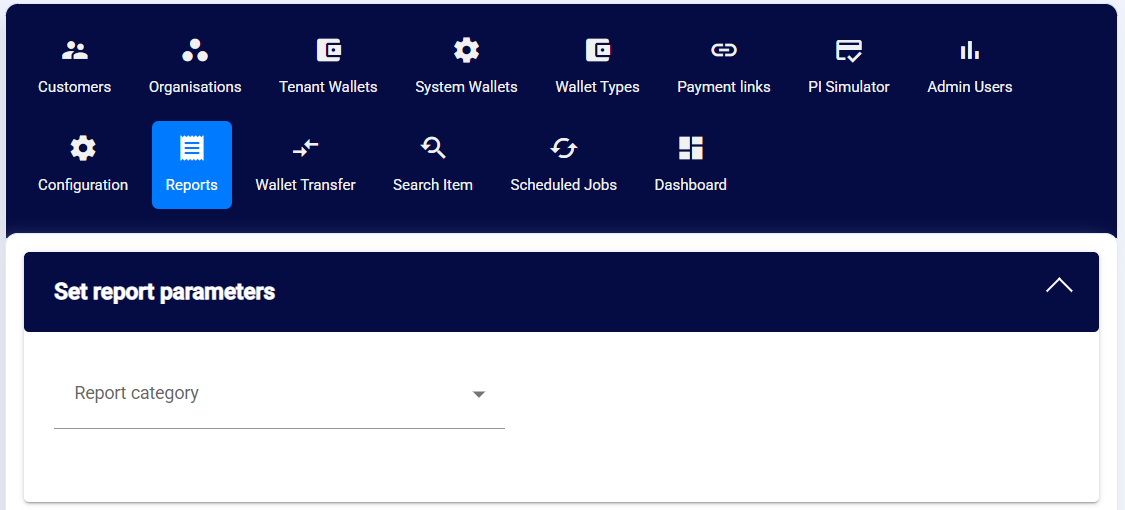
Navigate to the Reports section and select a report category
-
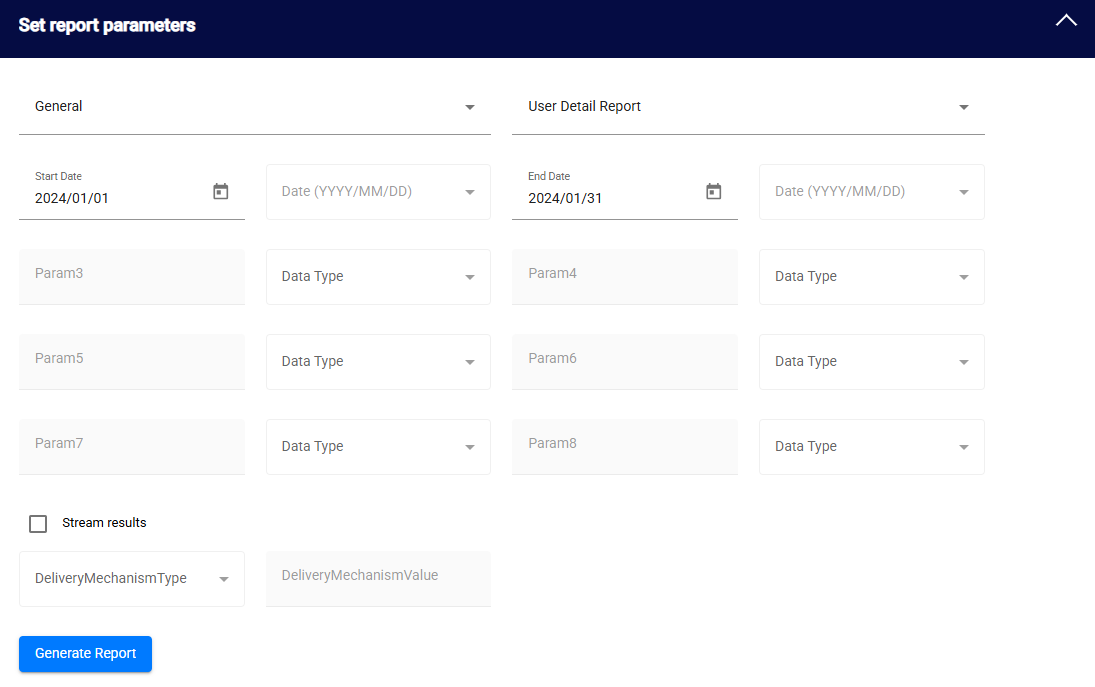
Select a report and enter any required parameters
-
Click Generate Report. Results appear at the bottom of the page. Download in CSV, JSON, XML, or XLS format.
For large reports that time out in the portal, the admin portal also supports streaming — see Asynchronous Report Delivery.
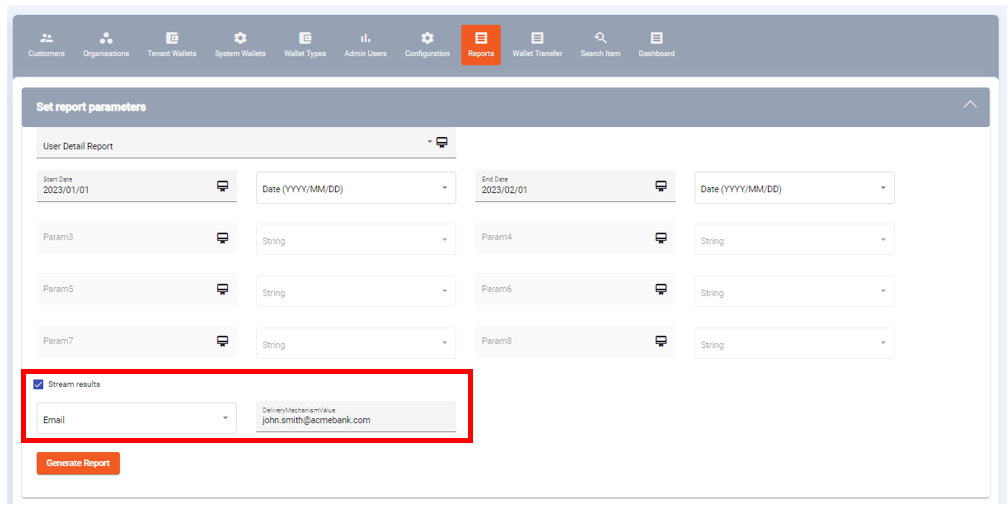
Report streaming in the Eclipse Admin Portal
Updated 3 months ago