
Flow of Funds
How a VAS purchase, its commission, and its reversal move money between the VAS reseller, Eclipse wallets, and eSolutions
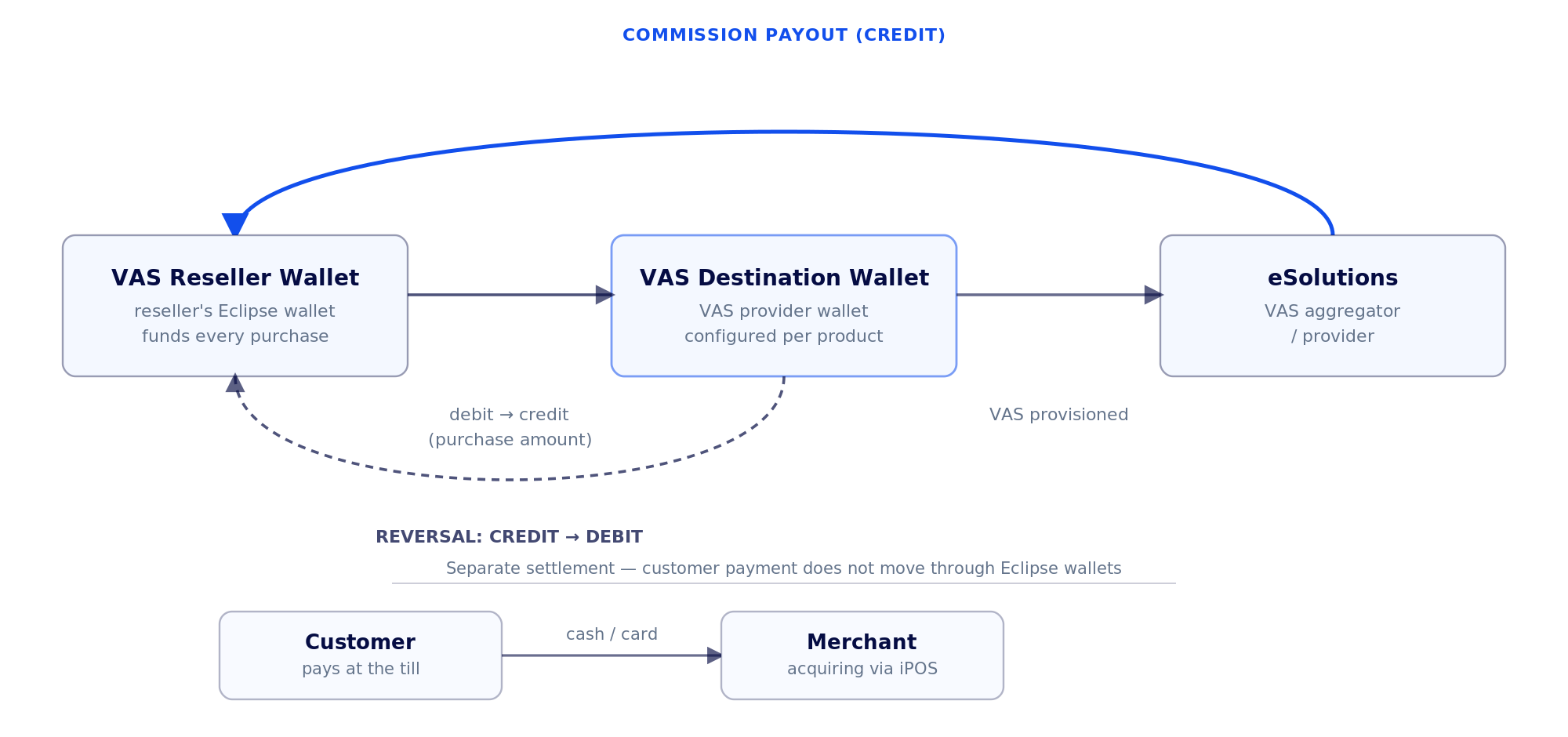
A VAS purchase moves money in two separate legs: the customer pays the merchant through the till's normal payment mechanism, and Eclipse settles the VAS reseller through a wallet-to-wallet transfer. The two legs are linked by the till transaction, but they are not the same movement of funds.
The flow
- The VAS reseller pre-funds their eSolutions account, represented in Eclipse by a VAS reseller wallet. This wallet is topped up ahead of time and is the source of funds for every VAS purchase the reseller's tills process.
- A customer requests a VAS product at the till. The request flows from the till through eSocket.POS, to Postilion, to Eclipse.
- Eclipse settles the purchase between wallets: the VAS reseller's wallet is debited, and the VAS destination wallet (configured per VAS provider — and optionally per reseller — in tenant configuration) is credited for the same amount.
- The customer pays the merchant through the merchant's standard payment mechanism — cash, or card acquiring routed through iPOS to the merchant's own account. This is a separate settlement from step 3 and does not itself move funds through Eclipse.
- Once payment is confirmed, the VAS is provisioned — the token, airtime, or bill confirmation is issued through eSolutions and returned to the till over the same path in reverse: eSolutions to Postilion to eSocket.POS, for the till to print or display to the customer.
Commission payments
VAS resellers are typically paid a commission on the VAS volume they sell, under their commercial agreement with EFT Corp. When eSolutions pays out an agreed commission, it is credited back into the same VAS reseller wallet that funds purchases in step 1 — it does not arrive in a separate wallet. This tops the reseller's wallet back up independently of, and in addition to, any manual top-ups the reseller makes.
Reversals
A reversal follows the same path in reverse: if a VAS purchase must be backed out (for example, a PROCURE that the till cannot confirm was successfully completed, or a printer failure after the token was issued), Eclipse reverses the wallet movement from step 3 — crediting the VAS reseller's wallet and debiting the VAS destination wallet — and eSolutions is notified through the same Postilion/eSocket.POS path so it can void or reverse the provisioned VAS where the upstream product allows it.
Only reverse a confirmed PROCUREAs with the underlying eSocket.POS interface (see VAS Developer Guide), only reverse a purchase that was actually committed. Do not offer a reversal for a REQUEST that was never PROCUREd, or for a PROCURE that is still in flight — there is nothing on either side to reverse yet.
Reporting and reconciliation
Every wallet movement described above — the per-purchase debit/credit, reversals, and commission credits — is a normal Eclipse wallet transaction, so it is already covered by the standard Eclipse reporting suite. You do not need a bespoke VAS report to reconcile this flow:
- Standard Reports catalogues every report available on an Eclipse tenant, including the full wallet transaction ledger (
Report_digital_wallet_transaction_detail) and point-in-time wallet balances (Report_digital_wallet_balance) — filter either by the VAS reseller's wallet ID to reconcile purchases, reversals, and commission credits against eSolutions' own statements. - These reports are run through the same Reports API used for every other Eclipse report — no separate integration is required for VAS reconciliation.
Updated about 2 months ago