
Crypto Use Cases
Issuing crypto wallets and enabling FIAT-to-crypto trading via VALR.
Eclipse has an open integration framework for connecting to crypto exchanges, allowing tenants to offer wallets whose store of value sits on the blockchain. Eclipse maintains a shadow ledger of all movements, while the actual balance is held on the integrated exchange — analogous to how a FIAT digital wallet's value sits in a pool bank account.
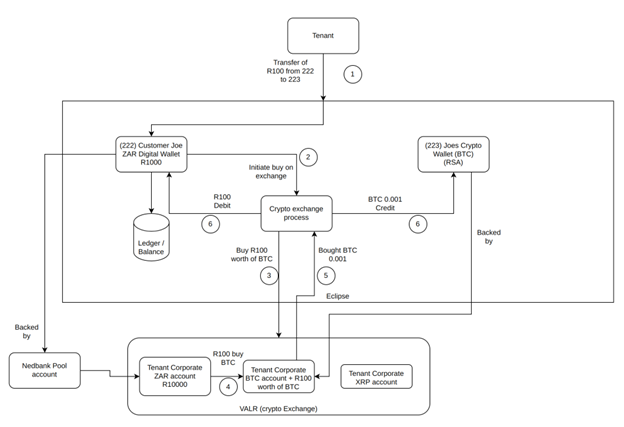
Crypto Use Case
Currently supported exchange: VALR (South Africa). Additional exchanges can be integrated in approximately 2–4 weeks.
Apple App Store: The App Store has strict rules about crypto integrations in iOS apps. If you intend to offer crypto features in an Apple App Store app, review the App Store Guidelines on crypto and financial services before building. Compliance with all applicable app store policies is the tenant's responsibility.
How Crypto Wallets Work
Customer FIAT Wallet (ZAR)   ←→   Customer Crypto Wallet (BTC)
                                         |
                                   VALR Exchange
(holds actual BTC)- When a customer transfers from a FIAT wallet to their crypto wallet, Eclipse instructs VALR to buy the equivalent amount of crypto at market rate.
- When a customer transfers from a crypto wallet to a FIAT wallet, Eclipse instructs VALR to sell the crypto and credit the ZAR proceeds.
- Balance reads on a crypto wallet fetch the live balance from VALR, not Eclipse's local ledger.
- Transaction history is sourced from VALR's transaction history API.
- External crypto withdrawals (sending crypto to an external wallet address) are processed via the VALR withdrawal API.
Prerequisites
Tenant configuration
| Config key | Description |
|---|---|
valrApiKey | VALR API key for the tenant's VALR account |
valrApiSecret | VALR API secret corresponding to the API key |
valrSubAccountId | VALR sub-account ID (optional — required only if using VALR sub-accounts) |
These must be set in the tenant's config before any crypto wallet operations will work.
System configuration
VALR must be registered as an external service in sd.external.services:
REST,VALR,https://api.valr.com,^/valr/, , ,60000,60000, ,/valrThis is a global system-level property configured by the operator, not per tenant.
Setting Up a Crypto Wallet Type
Crypto wallet types are configured by EFT Corporation during tenant onboarding. The key wallet type properties are:
| Property | Value |
|---|---|
walletTypeClass | com.ukheshe.services.wallet.simple.CryptoSimpleWallet |
exchangeImplementation | com.ukheshe.services.wallet.crypto.valr.ValrExchange |
Currency | The crypto currency code: BTC, ETH, USDC, etc. |
Each supported currency requires its own wallet type (e.g. one wallet type for BTC, a separate one for ETH).
Creating a Crypto Wallet for a Customer
Crypto wallet creation uses the same endpoint as any other wallet. The customer must have completed KYC first.
POST /eclipse-conductor/rest/v1/tenants/{tenantId}/customers/{customerId}/wallets
Authorization: Bearer {jwt}
Content-Type: application/json

{
  "walletTypeId": 9012,
  "status": "ACTIVE",
  "name": "Sipho's Bitcoin Wallet",
  "externalUniqueId": "wallet-sipho-btc-001"
}
Response (200 OK):
{
  "walletId": 2018374,
  "customerId": 4829104,
  "tenantId": 42,
  "walletTypeId": 9012,
  "name": "Sipho's Bitcoin Wallet",
  "currency": "BTC",
  "status": "ACTIVE",
  "currentBalance": 0,
  "availableBalance": 0,
  "friendlyId": "B7K3QX9P",
  "externalUniqueId": "wallet-sipho-btc-001",
  "created": "2026-05-19T10:10:00.000Z"
}
The wallet is created with a zero balance. To fund it, the customer transfers from their FIAT wallet.
Buying Crypto (FIAT → Crypto)
Use the standard wallet transfer endpoint. Eclipse detects that the destination is a crypto wallet and routes the transaction through the exchange.
POST /eclipse-conductor/rest/v1/tenants/{tenantId}/wallets/transfers
Authorization: Bearer {jwt}
Content-Type: application/json

{
  "fromWalletId": 1092847,
  "toWalletId": 2018374,
  "amount": 500.00,
  "description": "Buy BTC",
  "externalUniqueId": "buy-btc-sipho-001"
}
Eclipse debits the FIAT wallet for 500 ZAR, instructs VALR to buy the corresponding BTC amount at market rate, and credits the crypto wallet's shadow ledger.
Response (204 No Content)
Selling Crypto (Crypto → FIAT)
Transfer from the crypto wallet to the FIAT wallet. Eclipse instructs VALR to sell the crypto and deposits the ZAR proceeds.
POST /eclipse-conductor/rest/v1/tenants/{tenantId}/wallets/transfers
Authorization: Bearer {jwt}
Content-Type: application/json

{
  "fromWalletId": 2018374,
  "toWalletId": 1092847,
  "amount": 0.001,
  "description": "Sell BTC",
  "externalUniqueId": "sell-btc-sipho-001"
}
The amount is in the crypto currency's units. The FIAT equivalent at the time of execution is deposited into the destination wallet.
Checking Crypto Wallet Balance
GET on a crypto wallet fetches the live balance from VALR — not a cached value.
GET /eclipse-conductor/rest/v1/tenants/{tenantId}/wallets/{cryptoWalletId}
Authorization: Bearer {jwt}
Response (200 OK):
{
  "walletId": 2018374,
  "currency": "BTC",
  "currentBalance": 0.00152340,
  "availableBalance": 0.00152340,
  "status": "ACTIVE"
}
Because balance is fetched live from VALR, latency on GET wallet is higher for crypto wallets than for FIAT wallets. Cache balance values on the client side if needed.
Transaction History
GET /eclipse-conductor/rest/v1/tenants/{tenantId}/wallets/{cryptoWalletId}/transactions
Authorization: Bearer {jwt}
Transaction history is sourced from VALR. The response uses the same Transaction model as FIAT wallets.
Withdrawing Crypto to an External Address
To send crypto from a customer's Eclipse crypto wallet to an external blockchain address (e.g. their personal hardware wallet), use the standard withdrawal endpoint.
POST /eclipse-conductor/rest/v1/tenants/{tenantId}/wallets/{cryptoWalletId}/withdrawals
Authorization: Bearer {jwt}
Content-Type: application/json

{
  "amount": 0.001,
  "type": "GLOBAL_VALR",
  "description": "Withdraw BTC to hardware wallet",
  "externalUniqueId": "crypto-withdraw-001",
  "accountNumber": "bc1qxy2kgdygjrsqtzq2n0yrf2493p83kkfjhx0wlh"
}
The accountNumber is the destination blockchain address. Eclipse routes this withdrawal through VALR via the GLOBAL_VALR gateway.
Response (200 OK):
{
  "withdrawalId": 58821,
  "walletId": 2018374,
  "amount": 0.001,
  "currency": "BTC",
  "status": "PENDING",
  "description": "Withdraw BTC to hardware wallet",
  "created": "2026-05-19T12:00:00.000Z"
}
The withdrawal processes asynchronously. VALR broadcasts the transaction to the blockchain, and the status transitions to SUCCESSFUL once confirmed. Use the wallet movement notification webhook to receive status updates.
Checking withdrawal fees
Before initiating a withdrawal, you can check the current fee charged by VALR:
GET /eclipse-conductor/rest/v1/tenants/{tenantId}/wallets/{cryptoWalletId}/withdrawals/fees?amount=0.001
Authorization: Bearer {jwt}
Response:
{
  "feeAmount": 0.00006
}
Error Cases
| Scenario | HTTP status | Description |
|---|---|---|
| VALR API credentials not configured | 500 | valrApiKey or valrApiSecret not set in tenant config |
| Invalid blockchain address | 400 | VALR rejects the address format |
| Insufficient balance | 422 | Crypto wallet balance too low |
| Exchange connection error | 503 | VALR API unreachable |
| Unknown exchange implementation | 400 | exchangeImplementation not set on wallet type |
Permissions Required
| Permission | Description |
|---|---|
Wallet.CREATE.Allowed | Create a crypto wallet |
WalletTransfer.CREATE.Allowed | Buy or sell crypto via wallet transfer |
WalletWithdrawal.CREATE.Allowed | Withdraw crypto to external address |
Wallet.READ.Allowed | Check crypto wallet balance |
WalletHistory.READ.Allowed | View transaction history |
Updated 4 months ago