
Permissions Management
Permission System Overview
Eclipse uses a role and position-based access control system. Every API operation is gated by a permission key in the format:
<EntityType>.<AccessType>.AllowedFor wallet-specific permissions the format includes the wallet type:
<EntityType>.WalletType<N>.<AccessType>.AllowedWhere:
<EntityType>is the resource being accessed (e.g.Wallet,Customer,Card,Payment,Transfer)<AccessType>isCREATE,READ,UPDATE, orDELETE<N>is the zero-based index of the wallet type in the tenant's wallet type list (e.g.WalletType0,WalletType1)
The value of each permission key is a comma-separated list of roles and positions that are allowed to perform that operation. For example:
Transfer.WalletType1.CREATE.Allowed=CUSTOMER,GLOBAL_ADMIN,GLOBAL_FINANCE_L_2,INSTITUTION_ADMIN,INSTITUTION_FINANCE_L_2A special config key Everything.Allowed=true bypasses all permission checks for TENANT_SYSTEM system integrations. This should only be set on tenants where all API calls come from trusted server-side systems, never on tenants accessed by end-users.
Available Roles and Positions
| Category | Values |
|---|---|
| Global roles | GLOBAL_ADMIN, GLOBAL_FINANCE_L_1, GLOBAL_FINANCE_L_2, GLOBAL_FINANCE_L_3, GLOBAL_TECH_SUPPORT, GLOBAL_SUPPORT_L_1, GLOBAL_SUPPORT_L_2, GLOBAL_SUPPORT_L_3 |
| Institution roles | INSTITUTION_ADMIN, INSTITUTION_FINANCE_L_1, INSTITUTION_FINANCE_L_2, INSTITUTION_FINANCE_L_3, INSTITUTION_TECH_SUPPORT, INSTITUTION_SUPPORT_L_1, INSTITUTION_SUPPORT_L_2, INSTITUTION_SUPPORT_L_3, INSTITUTION_INTEGRATOR |
| Tenant positions | TENANT_SYSTEM, CUSTOMER, LEVEL_01–LEVEL_20 (configurable via tenantPositionAliases) |
| Organisation positions | MANAGER, HEAD, DIRECTOR, PARTNER |
| Special | ANONYMOUS (unauthenticated callers), ONBOARDING (self-registration flows) |
Global Shared permissions
Accountable institutions can define shared permissions configurations that can be applied across tenants to enforce those permissions. Any updates to the shared permission configuration are immediately applied to the tenants where those permissions are enforced.
Shared permissions can be general tenant permissions as well as wallet specific permissions. An example to use shared permissions is described below.
General tenant shared permissions
Define general tenant shared permissions in a global property that is prefixed with global.permissions.shared - e.g. global.permissions.shared.default
Address.CREATE.Allowed=GLOBAL_ADMIN,GLOBAL_TECH_SUPPORT,GLOBAL_SUPPORT_L_3,INSTITUTION_ADMIN,INSTITUTION_TECH_SUPPORT,INSTITUTION_SUPPORT_L_3
Address.DELETE.Allowed=GLOBAL_ADMIN,INSTITUTION_ADMIN
Address.READ.Allowed=GLOBAL_FINANCE_L_1,GLOBAL_FINANCE_L_2,GLOBAL_FINANCE_L_3,GLOBAL_TECH_SUPPORT,GLOBAL_SUPPORT_L_3,GLOBAL_ADMIN,INSTITUTION_ADMIN,INSTITUTION_FINANCE_L_1,INSTITUTION_FINANCE_L_2,INSTITUTION_FINANCE_L_3,INSTITUTION_TECH_SUPPORT,INSTITUTION_SUPPORT_L_3
Address.UPDATE.Allowed=GLOBAL_TECH_SUPPORT,GLOBAL_ADMIN,GLOBAL_SUPPORT_L_3,INSTITUTION_ADMIN,INSTITUTION_SUPPORT_L_3,INSTITUTION_TECH_SUPPORT
Card.CREATE.Allowed=GLOBAL_ADMIN,GLOBAL_TECH_SUPPORT,INSTITUTION_ADMIN,INSTITUTION_TECH_SUPPORT
Card.DELETE.Allowed=GLOBAL_ADMIN,INSTITUTION_ADMIN
Card.READ.Allowed=GLOBAL_ADMIN,GLOBAL_FINANCE_L_1,GLOBAL_FINANCE_L_2,GLOBAL_FINANCE_L_3,GLOBAL_TECH_SUPPORT,GLOBAL_SUPPORT_L_1,GLOBAL_SUPPORT_L_2,GLOBAL_SUPPORT_L_3,INSTITUTION_ADMIN,INSTITUTION_FINANCE_L_1,INSTITUTION_FINANCE_L_2,INSTITUTION_FINANCE_L_3,INSTITUTION_TECH_SUPPORT,INSTITUTION_SUPPORT_L_1,INSTITUTION_SUPPORT_L_2,INSTITUTION_SUPPORT_L_3
Card.UPDATE.Allowed=GLOBAL_ADMIN,GLOBAL_SUPPORT_L_3,GLOBAL_SUPPORT_L_2,INSTITUTION_ADMIN,INSTITUTION_TECH_SUPPORT,INSTITUTION_SUPPORT_L_1,INSTITUTION_SUPPORT_L_2,INSTITUTION_SUPPORT_L_3
CardOnFile.CREATE.Allowed=GLOBAL_ADMIN,INSTITUTION_ADMIN
Apply general tenant shared permissions to a particular tenant by setting tenant config SharedPermissionsConfig to the suffix of the global property name. For example, to apply the permissions in global property global.permissions.shared.default, set:
Key:   SharedPermissionsConfig
Value: default
Any update to the global.permissions.shared.default property is immediately applied to all tenants referencing it — no per-tenant changes needed.
General wallet specific shared permissions
Define wallet specific permissions in a global property that is prefixed with global.permissions.shared.wallet - e.g. global.permissions.shared.wallet.system
BarWallet.WalletType.UPDATE.Allowed=GLOBAL_FINANCE_L_2,GLOBAL_FINANCE_L_3,GLOBAL_SUPPORT_L_2,GLOBAL_SUPPORT_L_3,GLOBAL_ADMIN,GLOBAL_SUPPORT_L_1,INSTITUTION_FINANCE_L_2,INSTITUTION_FINANCE_L_3,INSTITUTION_SUPPORT_L_2,INSTITUTION_SUPPORT_L_3,INSTITUTION_ADMIN,INSTITUTION_SUPPORT_L_1
UnbarWallet.WalletType.UPDATE.Allowed=GLOBAL_FINANCE_L_2,GLOBAL_FINANCE_L_3,GLOBAL_SUPPORT_L_3,INSTITUTION_FINANCE_L_2,INSTITUTION_FINANCE_L_3,INSTITUTION_SUPPORT_L_3
Reservation.WalletType.CREATE.Allowed=GLOBAL_FINANCE_L_2->GLOBAL_FINANCE_L_2,GLOBAL_FINANCE_L_3->GLOBAL_FINANCE_L_2,GLOBAL_ADMIN,GLOBAL_TECH_SUPPORT,INSTITUTION_FINANCE_L_2->INSTITUTION_FINANCE_L_2,INSTITUTION_FINANCE_L_3->INSTITUTION_FINANCE_L_2,INSTITUTION_ADMIN,INSTITUTION_TECH_SUPPORT
Reservation.WalletType.DELETE.Allowed=GLOBAL_FINANCE_L_2->GLOBAL_FINANCE_L_2,GLOBAL_FINANCE_L_3->GLOBAL_FINANCE_L_2,GLOBAL_ADMIN,GLOBAL_SUPPORT_L_2,GLOBAL_SUPPORT_L_3,INSTITUTION_FINANCE_L_2->INSTITUTION_FINANCE_L_2,INSTITUTION_FINANCE_L_3->INSTITUTION_FINANCE_L_2,INSTITUTION_ADMIN,INSTITUTION_SUPPORT_L_2,INSTITUTION_SUPPORT_L_3
Reservation.WalletType.READ.Allowed=GLOBAL_FINANCE_L_2,GLOBAL_ADMIN,GLOBAL_FINANCE_L_1,GLOBAL_TECH_SUPPORT,GLOBAL_SUPPORT_L_1,GLOBAL_SUPPORT_L_2,GLOBAL_SUPPORT_L_3,INSTITUTION_FINANCE_L_2,INSTITUTION_ADMIN,INSTITUTION_FINANCE_L_1,INSTITUTION_TECH_SUPPORT,INSTITUTION_SUPPORT_L_1,INSTITUTION_SUPPORT_L_2,INSTITUTION_SUPPORT_L_3
Reservation.WalletType.UPDATE.Allowed=GLOBAL_ADMIN,GLOBAL_FINANCE_L_2->GLOBAL_FINANCE_L_2,GLOBAL_FINANCE_L_3->GLOBAL_FINANCE_L_2,INSTITUTION_ADMIN,INSTITUTION_FINANCE_L_2->INSTITUTION_FINANCE_L_2,INSTITUTION_FINANCE_L_3->INSTITUTION_FINANCE_L_2
TransactionDescription.WalletType.READ.Allowed=GLOBAL_ADMIN,GLOBAL_FINANCE_L_1,GLOBAL_FINANCE_L_2,GLOBAL_FINANCE_L_3,GLOBAL_TECH_SUPPORT,GLOBAL_SUPPORT_L_1,GLOBAL_SUPPORT_L_2,GLOBAL_SUPPORT_L_3,INSTITUTION_ADMIN,INSTITUTION_FINANCE_L_1,INSTITUTION_FINANCE_L_2,INSTITUTION_FINANCE_L_3,INSTITUTION_TECH_SUPPORT,INSTITUTION_SUPPORT_L_1,INSTITUTION_SUPPORT_L_2,INSTITUTION_SUPPORT_L_3
Wallet.WalletType.CREATE.Allowed=GLOBAL_ADMIN,GLOBAL_FINANCE_L_2,GLOBAL_TECH_SUPPORT,INSTITUTION_ADMIN,INSTITUTION_FINANCE_L_2,INSTITUTION_TECH_SUPPORT
Wallet.WalletType.DELETE.Allowed=GLOBAL_ADMIN,INSTITUTION_ADMIN
Apply wallet-specific shared permissions to a wallet type by setting the wallet type attribute SharedPermissionsConfig to the suffix of the global property name. For example, to apply global.permissions.shared.wallet.system to the System wallet type, set the SharedPermissionsConfig attribute on that wallet type to system.
This can be done in the Admin Portal under Wallet Types → [wallet type] → Attributes, or via the wallet type update API.
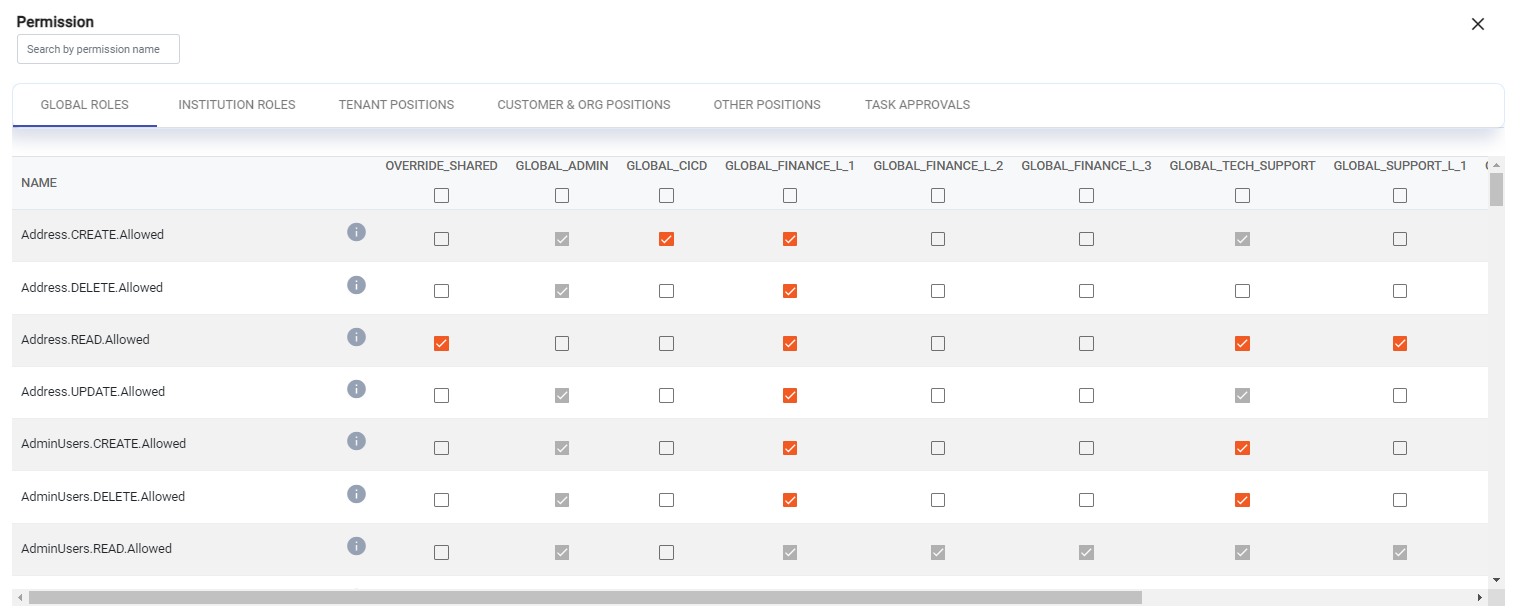
Global shared permissions can be viewed in the Eclipse Admin Portal but are not editable. The OVERRIDE_SHARED permissions configurations can be used to allow administrators to override the global shared permissions in circumstances where this is required:
Reporting Permissions
Eclipse has a rich reporting capability where standard and bespoke reports can be accessed through the Eclipe Admin Portal or via API calls. For more details please refer to the Reporting section in the Eclipse Integration Guide here.
Eclipse supports granular permissions when accessing these reports and READ access to individual reports can be granted to specific roles and positions. Default permissions are applied to standard and dashboard reports, identified as reports where the Report ID starts with the keyword Report or Dashboard. The following roles and positions have READ access to these reports by default:
| Category | Role/Position |
|---|---|
| GLOBAL roles | GLOBAL_ADMIN, GLOBAL_FINANCE_L_1, GLOBAL_FINANCE_L_2, GLOBAL_FINANCE_L_3, GLOBAL_TECH_SUPPORT, GLOBAL_SUPPORT_L_1, GLOBAL_SUPPORT_L_2, GLOBAL_SUPPORT_L_3 |
| INSTITUTION roles | INSTITUTION_ADMIN, INSTITUTION_FINANCE_L_1, INSTITUTION_FINANCE_L_2, INSTITUTION_FINANCE_L_3, INSTITUTION_TECH_SUPPORT, INSTITUTION_SUPPORT_L_1, INSTITUTION_SUPPORT_L_2, INSTITUTION_SUPPORT_L_3, INSTITUTION_INTEGRATOR |
| TENANT positions | LEVEL_01, LEVEL_02, LEVEL_03, LEVEL_04, LEVEL_05, TENANT_SYSTEM |
If additional roles or positions need access to these reports, or if a report is not a standard or dashboard report, set an explicit permission as a tenant configuration item in the following format:
Report.<Report_ID>.<READ|UPDATE|DELETE>.Allowed=<comma-separated roles and positions>For example, to grant TENANT_SYSTEM access to a custom PaymentDetails report and grant LEVEL_06 access to the standard Report_user_detail report:
Report.PaymentDetails.READ.Allowed=TENANT_SYSTEM,GLOBAL_ADMIN
Report.Report_user_detail.READ.Allowed=LEVEL_06,LEVEL_04,GLOBAL_ADMIN
Reporting permissions
Updated 4 months ago