
Audit Logging
Eclipse logs every API request and response across the platform. This audit trail is retained for 3+ years and covers all activity within your tenant — every API call made by your users, your backend systems, and the Eclipse platform itself.
Audit logs are not available as a self-service report. Access is provided on request for fraud investigations, compliance reviews, dispute resolution, and incident response.
What Is Logged
Every API call processed by Eclipse produces a log entry that includes:
- The HTTP method and path of the request
- The request body — sensitive fields such as passwords and card PANs are redacted automatically
- The HTTP response code and response body
- The identity of the authenticated user or system that made the call
- The source IP address of the caller
- The timestamp of the request and the response
- The tenant ID under which the request was processed
Filter Dimensions
When you raise an audit log request, you can narrow the results using any combination of the following filters:
| Filter | Description | Example |
|---|---|---|
| Time range | Restrict to a specific date and time window | 2024-03-15T00:00:00 to 2024-03-15T23:59:59 |
| User identity | Filter by the email or username of the API caller | [email protected] |
| User ID | Filter by the numeric Eclipse user ID | 45678 |
| API path | Filter by request URL path — supports partial matching | /wallets/51588 |
| Source IP | Filter by originating IP address | 105.233.41.30 |
| Free text | Search across all log fields | insufficient funds |
Reading Audit Log Entries
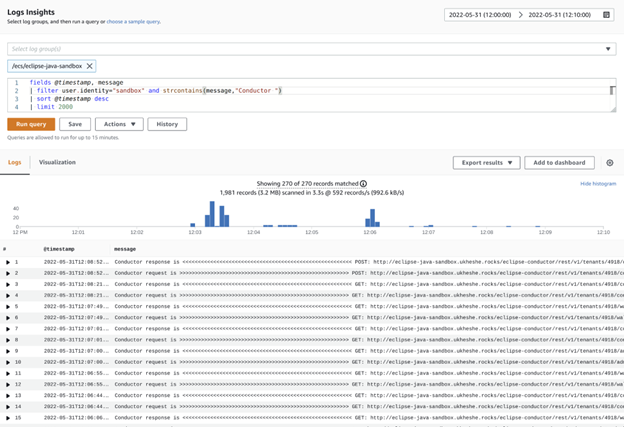
Below is an example of API calls filtered by user identity, showing all calls made by the sandbox user over a given period:
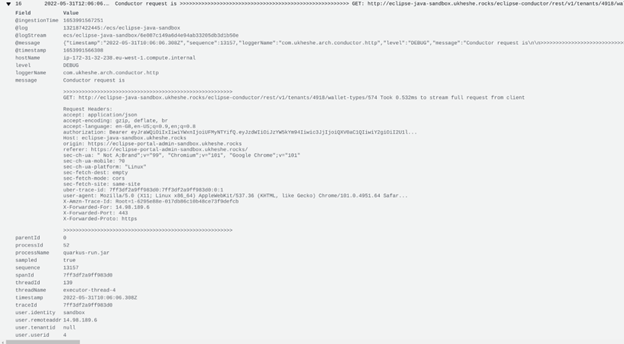
Expanding an entry shows the full request detail:
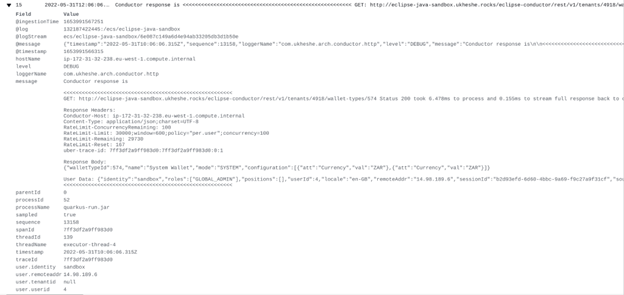
And the corresponding response:
Requesting Access
To request audit log data, contact your Eclipse account manager or raise a support ticket with:
- Your tenant ID
- The date and time range of interest
- The filter criteria you want applied (user identity, IP, API path, or free text)
- The reason for the request — e.g. fraud investigation, dispute resolution, compliance review
Audit log data is typically delivered as a CSV or JSON export.
Updated 5 months ago